







VPNs and antivirus software are often confused, but they serve very different roles in online security.
A VPN protects your privacy on the internet by encrypting traffic and hiding your IP address, while antivirus software protects your device itself by detecting, blocking, and removing malware like viruses, ransomware, and spyware.
One secures the connection, the other secures the system. Our blog breaks down the key differences between VPN vs antivirus, explains what each tool protects (and what it doesn’t), and helps you decide when you need one, the other, or both.
Key Takeaways
|
How a VPN Works
A Virtual Private Network (VPN) protects your online privacy by creating a secure, encrypted connection between your device and a remote server.
Instead of connecting to the internet directly, your traffic is routed through this VPN server, which masks your real IP address and makes your data unreadable to ISPs, hackers, or anyone monitoring the network.
Here’s what happens technically, in simple terms:
- Encryption: The VPN app encrypts your internet traffic before it leaves your device. Even if data is intercepted, it appears as unreadable code.
- Secure tunnel: An encrypted “tunnel” is established between your device and the VPN server, protecting data in transit.
- IP masking: The VPN server replaces your real IP address with its own, hiding your physical location.
- Data routing: Websites and apps see the VPN server as the source of traffic, not your device.
This is why VPNs are commonly used to secure public Wi-Fi, protect privacy from ISPs, and bypass geo-restrictions. However, a VPN is not a full security solution; it solves privacy problems, not malware threats.
What a VPN Protects?
A VPN is designed to protect connections and data in transit, not your device’s internal security. Here is what a VPN can do:
- Online privacy (ISP & third parties): Your Internet Service Provider and network administrators cannot see your browsing activity.
- Public Wi-Fi security: Data sent over cafés, hotels, or airport Wi-Fi is encrypted, reducing the risk of man-in-the-middle attacks.
- IP address and location: Your real IP address is hidden, helping bypass geo-restrictions and censorship.
- Sensitive transactions: Login credentials, banking data, and shopping activity are protected from network-level snooping.
What a VPN Cannot Protect?
A VPN is designed to protect connections and data in transit, not your device’s internal security.
- Online privacy (ISP & third parties): Your Internet Service Provider and network administrators cannot see your browsing activity.
- Public Wi-Fi security: Data sent over cafés, hotels, or airport Wi-Fi is encrypted, reducing the risk of man-in-the-middle attacks.
- IP address and location: Your real IP address is hidden, helping bypass geo-restrictions and censorship.
- Sensitive transactions: Login credentials, banking data, and shopping activity are protected from network-level snooping.
How Antivirus Works
Antivirus software protects your device by detecting, blocking, and removing malicious software (malware) that can damage systems, steal data, or take control of your computer or phone.
Antivirus focuses on what runs on your device files, processes, and system behavior. Modern antivirus tools rely on multiple detection layers rather than a single method:
- Signature-based detection: The antivirus compares files against a constantly updated database of known malware signatures.
- Heuristic and behavioral analysis: The software monitors real-time activity for suspicious behavior, such as unauthorized file changes or encryption attempts, even if the malware is new.
- Sandboxing: Suspicious files are executed in a controlled, isolated environment to observe behavior without risking the actual system.
- Cloud-based scanning: Threat intelligence is updated continuously through cloud services, allowing faster detection of emerging malware.
This multi-layered approach helps antivirus software stop both known threats and many new variants but it is not perfect.
What Antivirus Protects
Antivirus software is designed to secure devices and stored data, not network privacy.
- Malware infections: Detects and removes viruses, Trojans, worms, spyware, and keyloggers.
- Ransomware: Blocks unauthorized file encryption attempts and malicious system locks.
- System files and personal data: Prevents unauthorized modification of operating system files and documents.
- Downloads and attachments: Scans files from the web, email attachments, and external sources before execution.
What Antivirus Cannot Protect
Even the best antivirus software has clear limits.
- Social engineering and phishing: Antivirus cannot stop users from entering passwords or payment details on fake websites.
- Zero-day exploits: Brand-new vulnerabilities may bypass detection until security patches or signature updates are released.
- Physical theft: Antivirus cannot prevent someone from stealing a device or accessing it if security controls are weak.
- Advanced fileless attacks: Some sophisticated malware runs entirely in memory, reducing visibility for traditional scanners.
In short, antivirus software protects what happens on your device, while network-level privacy and location masking require a VPN.
VPN vs Antivirus: Key Differences Explained
VPNs and antivirus software solve different problems. A VPN protects privacy and network security by encrypting traffic and masking your IP address. Antivirus protects device security by detecting, blocking, and removing malware.
Use a VPN to protect data in transit. Use antivirus to protect what runs and lives on your device. Using both gives the most complete coverage.
Quick comparison table
| Category | VPN | Antivirus |
| Main goal | Privacy and secure connection | Malware prevention and removal |
| Protects | Traffic on networks | Device files and processes |
| Stops hacking on public Wi-Fi | Helps a lot | Not its job |
| Stops malware from downloads | No | Yes |
| Hides IP address | Yes | No |
| Best when | Streaming, travel, public Wi-Fi, censorship | Downloads, attachments, everyday device safety |
Purpose: privacy vs malware defense
- VPN: Encrypts internet traffic, masks your IP address, and reduces ISP/third-party tracking.
- Antivirus: Detects and removes viruses, ransomware, spyware, trojans, and other malware.
What each one protects (scope)
- VPN protects network activity:
- Browsing on public Wi-Fi (cafes, hotels, airports)
- Hiding traffic from your ISP
- Reducing location-based tracking
- Bypassing geo-restrictions (where allowed)
- Antivirus protects the device:
- Blocking malicious downloads and infected installers
- Stopping ransomware from encrypting files
- Detecting spyware/keyloggers that steal credentials
- Scanning attachments and external files (USB, email)
Data in transit vs data at rest
- VPN is data in transit: protects what you send/receive online (encrypted tunnel).
- Antivirus is data at rest and execution: protects files on disk and what programs do when they run.
What happens in common real-world scenarios
- Public Wi-Fi at an airport: VPN helps prevent interception of traffic on a risky network. Antivirus does nothing against Wi-Fi snooping unless malware is installed.
- Downloading a “free cracked” app: Antivirus may detect the trojan/ransomware. VPN does not stop you from downloading malware.
- Phishing login page: Antivirus may warn sometimes, but phishing is mostly a user-decision trap. VPN doesn’t stop you from typing your password into a fake site.
Can a VPN Protect You From Viruses?
No, a VPN cannot protect you from viruses, malware, or ransomware. A VPN encrypts your internet traffic and hides your IP address, so it helps with privacy (especially on public Wi-Fi). But a VPN does not:
- Scan files for malicious code
- Detect or remove malware already on your device
- Block phishing when you enter credentials on a fake site
- Stop infected downloads from running
Use a VPN and antivirus together for real coverage: the VPN protects your connection, and antivirus protects your device from malware and unsafe files.
Can Antivirus Replace a VPN?
No, Antivirus software cannot replace a VPN. Antivirus and VPN tools solve different security problems and are designed to work together, not as substitutes.
Antivirus software focuses on device security:
- Detects and removes malware, ransomware, spyware, and trojans
- Scans downloads, email attachments, and system files
- Helps prevent damage after a malicious file reaches your device
A VPN focuses on network privacy and data protection:
- Encrypts internet traffic so ISPs and hackers can’t read it
- Masks your real IP address and location
- Secures data on public Wi-Fi and bypasses geo-restrictions
What antivirus cannot do:
- Encrypt internet traffic
- Hide your IP address from websites or ISPs
- Protect data from interception on unsecured networks
What a VPN cannot do:
- Detect or remove malware
- Block infected files from running
Antivirus protects what’s on your device. A VPN protects how your data travels online. For complete protection, use both as part of a layered security setup.
When Should You Use a VPN?
You should use a VPN whenever your internet connection or location puts your privacy, data, or access at risk. Below are the most common and practical situations where a VPN is strongly recommended.
Using Public Wi-Fi in Cafes, Hotels, Airports
Public Wi-Fi networks are often unsecured and easy targets for attackers. A VPN encrypts your internet traffic, preventing hackers on the same network from intercepting:
- Login credentials
- Emails and messages
- Banking or payment data
Without a VPN, anyone sharing the same Wi-Fi network can potentially monitor or manipulate your traffic.
Remote Work and Secure Business Data Access
When working remotely, especially outside a company office, a VPN helps protect:
- Internal documents and databases
- Corporate emails and cloud tools
- Sensitive client or financial information
Many businesses require employees to use a VPN to create a secure connection to internal systems and reduce the risk of data leaks when accessing company resources from home or abroad.
Bypassing Geo-Restrictions and Censorship
When working remotely, especially outside a company office, a VPN helps protect:
- Internal documents and databases
- Corporate emails and cloud tools
- Sensitive client or financial information
Many businesses require employees to use a VPN to create a secure connection to internal systems and reduce the risk of data leaks when accessing company resources from home or abroad.
When Should You Use Antivirus?
You should use antivirus software whenever your device is exposed to files, downloads, or user-driven threats. Antivirus focuses on protecting the device itself, not the network connection.
Protecting Against Malware, Ransomware, and Spyware
Antivirus software is essential for detecting and blocking:
- Viruses and Trojans hidden in files or software installers
- Ransomware that encrypts personal or business data
- Spyware and keyloggers that silently track activity
Real-time scanning and behavioral detection help stop threats before they damage the operating system or steal sensitive information.
Avoiding Phishing Emails and Malicious Links
Many cyberattacks start with social engineering rather than technical exploits. Antivirus tools help by:
- Scanning email attachments for malicious code
- Warning about known phishing websites
- Blocking links associated with scams or credential theft
While antivirus cannot prevent all user mistakes, it significantly reduces the risk of falling for common email-based attacks.
Securing Downloads and External Files (USB, Attachments)
Any file introduced to a device can carry malware. Antivirus software protects against threats from:
- Downloaded software, documents, and media files
- USB drives and external storage devices
- Email attachments and shared files
Automatic scanning ensures files are checked before they are opened or executed, reducing the chance of accidental infection.
Do You Need Both VPN and Antivirus?
Yes, it is highly recommended to use both a VPN and an antivirus for comprehensive digital security. A VPN (Virtual Private Network) secures your internet connection and protects data privacy, while antivirus software detects and removes malware, viruses, and ransomware from your device. They protect against different, complementary threats.
Using both a VPN and antivirus software together provides far stronger protection than relying on only one.
A VPN protects your network layer:
- Encrypts internet traffic
- Hides your IP address and location
- Secures data on public Wi-Fi
- Prevents ISPs, trackers, and hackers from monitoring activity
An antivirus protects your device layer:
- Scans files and downloads for malware
- Blocks viruses, ransomware, spyware, and keyloggers
- Detects malicious behavior on the system
- Protects stored data and operating system files
Why one alone is not enough
- A VPN cannot detect or remove malware already on your device
- Antivirus cannot encrypt traffic or protect data on unsecured networks
- Phishing, infected downloads, and network attacks often happen together
The safest setup
- VPN and Antivirus is layered security
- VPN secures data in transit
- Antivirus secures data on the device
This combination is considered best practice for everyday users, remote workers, travelers, and anyone using public Wi-Fi or downloading files regularly.
Free VPN Risks vs Paid Antivirus: Which Is Safer?
Paid antivirus software is generally safer than free VPN services, especially if you must choose one. However, paid antivirus software and free VPN services solve different security problems.
Choosing between free VPN vs paid antivirus depends on what type of protection you need: device security or online privacy.
Not all free VPN services are dangerous, but many operate under strict limitations or alternative monetization models. Common risks include:
- Data collection and logging: Some free VPN providers collect browsing data, connection logs, or usage patterns to fund operations.
- Weak encryption implementation: Limited resources may lead to outdated protocols or poor security configuration.
- Ad-supported apps: Some free VPN apps include intrusive ads or tracking libraries.
- No kill switch: Without a kill switch, temporary connection drops may expose the real IP address.
- Severe limitations: Data caps, bandwidth throttling, and server congestion reduce performance and reliability.
Free VPN services can provide basic encryption for light browsing but may not deliver consistent privacy or strong infrastructure.
Paid antivirus software focuses on endpoint protection, but paid antivirus software does not secure everything. Key limitations include:
- No traffic encryption: Paid antivirus does not encrypt internet traffic. ISPs, public Wi-Fi attackers, or network observers can still monitor browsing activity.
- No IP masking: Paid antivirus does not hide the real IP address or location from websites and trackers.
- No protection against ISP tracking: Browsing history remains visible to the internet service provider.
- Limited privacy protection: Paid antivirus blocks malware but does not prevent behavioral tracking or data profiling.
- Reactive protection model: Antivirus detects and removes threats after exposure attempts. Antivirus does not prevent traffic interception on unsecured networks.
Paid antivirus protects files, applications, and operating systems from malware. Paid antivirus does not provide anonymity, encryption, or geo-location flexibility.
Why TurisVPN Is a Smart Choice for Privacy Protection
TurisVPN is designed for users who want real privacy protection without the risks that come with free VPNs.
Unlike freemium services that rely on data caps, traffic limits, or aggressive monetization, TurisVPN focuses on encrypted, stable connections and transparent privacy practices. It protects online activity from ISPs, trackers, and unsecured networks while avoiding common problems like server congestion and sudden IP leaks.
TurisVPN uses modern VPN protocols with strong encryption, supports unlimited bandwidth, and minimizes DNS leaks and connection drops key factors for safe browsing, streaming, and remote work. This makes TurisVPN a practical privacy layer rather than a “best-effort” free tool.
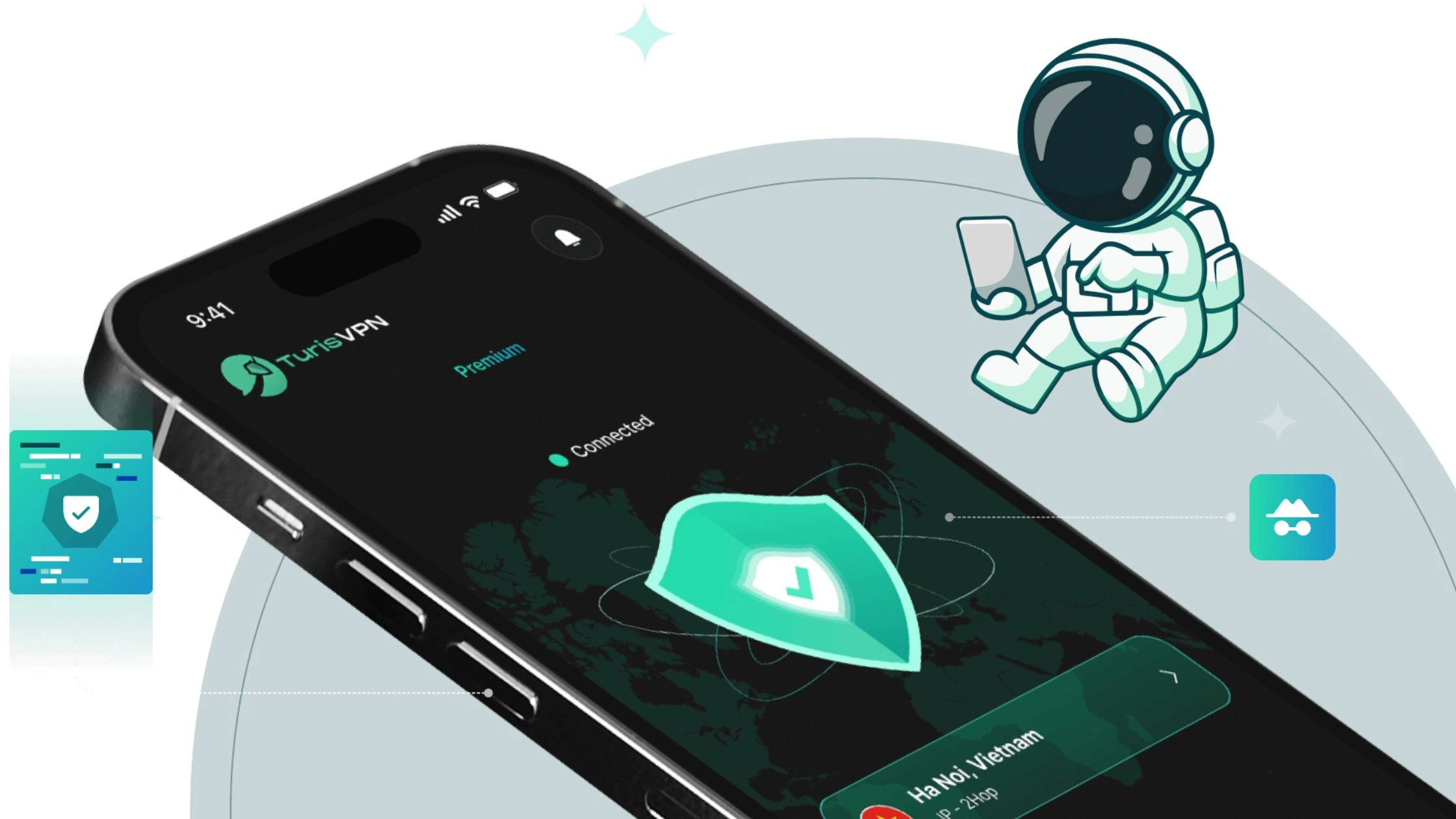
Quick Start: How to Use TurisVPN for Privacy Protection
- Step 1: Download TurisVPN: Install the TurisVPN app on iOS or Android, or add the TurisVPN browser extension on PC or macOS.
- Step 2: Sign in and Choose a Server: Open TurisVPN and select a server location that fits your needs (nearby for speed, specific regions for access).
- Step 3: Enable Protection: Tap Connect to activate encryption and IP masking before browsing or using public Wi-Fi.
- Step 4: Browse Securely: Once connected, internet traffic is encrypted, your IP address is hidden, and DNS leak protection stays active in the background.
For users who care about privacy, consistent performance, and safer everyday browsing, TurisVPN offers a reliable alternative to risky free VPNs without replacing essential tools like antivirus software.
Bottom Line
VPNs and antivirus software solve different security problems, and choosing one over the other leaves gaps in your protection.
A VPN protects online privacy by encrypting internet traffic, hiding your IP address, and securing public Wi-Fi connections. Antivirus software protects the device itself by detecting, blocking, and removing malware such as viruses, ransomware, and spyware.
A VPN cannot stop infected downloads or phishing attacks, and antivirus software cannot prevent network-level tracking or data interception on unsecured networks. That’s why the safest approach is not VPN or antivirus, but VPN and antivirus working together.
FAQs
Q1. Should I get a VPN or antivirus first?
Get an antivirus first if your device is not protected against malware. Antivirus software blocks viruses, ransomware, and spyware that can immediately damage your system. Add a VPN next to protect your privacy, especially if you use public Wi-Fi, work remotely, or want to hide your IP address online.
Q2. Can a VPN be used as an antivirus?
No, a VPN cannot replace antivirus software. A VPN encrypts internet traffic and hides your IP address, but it does not scan files, detect malware, or stop viruses from infecting your device.
Q3. Can I still get a virus if I use a VPN?
Yes, a VPN does not prevent malicious downloads, phishing attacks, or infected email attachments. You can still get a virus while using a VPN if you download unsafe files or click malicious links without antivirus protection.
Q4. Is a firewall better than a VPN?
No, a firewall and a VPN serve different purposes. A firewall controls which connections are allowed into or out of your device or network, while a VPN encrypts traffic and hides your IP address. For strong security, a firewall, VPN, and antivirus should be used together, not compared as replacements.





