Many users wonder, What does Google know about me because Google collects an enormous amount of data about users. Some information includes search queries, browsing history, YouTube activity, location, and app usage. Google has over 4.91 billion active users worldwide. Every day, it collects data to power personalized recommendations, targeted ads, and predictive features across its services.
In this blog post, we explain what information Google collects and why. You’ll also learn how to view your data and use simple strategies to reduce your digital footprint while keeping control of your privacy
Key Takeaways
| – Google collects search history, YouTube activity, location, app usage, and device info. – Data is used for personalization: targeted ads, recommendations, and optimized services. – Privacy risks exist: profiling, potential breaches, behavioral influence, and third-party sharing. – Users can manage data, view, delete, or auto-delete activity via Google My Activity and Takeout. – Using TurisVPN, privacy-focused browsers, and non-tracking search engines reduces data collection. |
Types of Data Google Collects To Know About Me
Google collects a lot of information from its users. It builds detailed profiles that go far beyond just basic personal details.

Here’s a breakdown of the main types of data Google gathers:
Search & Browsing History
Google logs every search you make and every site you visit through Chrome or Google Search. If Device Sync is on, Chrome saves your history across all connected devices. This helps Google learn your interests and habits.
YouTube / Video & Content Engagement
On YouTube, Google tracks what you watch, like, comment on, and subscribe to. These actions shape your recommendations and decide what shows up in your feed.
Location & Movement Tracking
Google gathers location data from GPS, Android devices, Wi-Fi, and IP addresses. It can know where you are, the places you often visit, and even your travel patterns.
Device / App Usage & System Data
Google collects details about your devices and apps. This includes device type, operating system, browser, battery level, plugins, microphone, and SIM information.
Fingerprinting and sound tests help identify your device and build an ongoing activity profile.
Advertising Profile & Demographics
From your activity, Google guesses your interests, age, gender, and other traits. This information is used to show targeted ads and personalized content, often making it feel like Google knows everything about you.
Why Does Google Collect All This Data?
If you’ve ever wondered why Google seems to know everything, it’s because of how it uses your data. Google collects large amounts of information to improve its services and earn revenue. Here are the main reasons:
- Personalized Experience Google studies your searches, YouTube history, and Maps activity. This helps it give you tailored content, more relevant search results, and recommendations that feel useful.
- Targeted Ads Google builds a profile of your interests, age, and behavior. It then shows ads that match you better. This keeps you engaged and increases company revenue.
- Better Services Your data helps Google find errors, boost performance, and improve Google Assistant and Google Translate. This makes the services faster and smarter.
- Security and Protection Google checks your location, devices, and login attempts. If something looks suspicious, it can warn you and stop fraud.
- Market Research Google also combines user data (anonymously) to spot trends. This helps guide new features and product improvements.
How to See What Google Knows About Me
You can get a detailed view of what Google knows about you by checking your Google Account dashboard. The key area is Data & Privacy, where all collected information and settings are displayed.
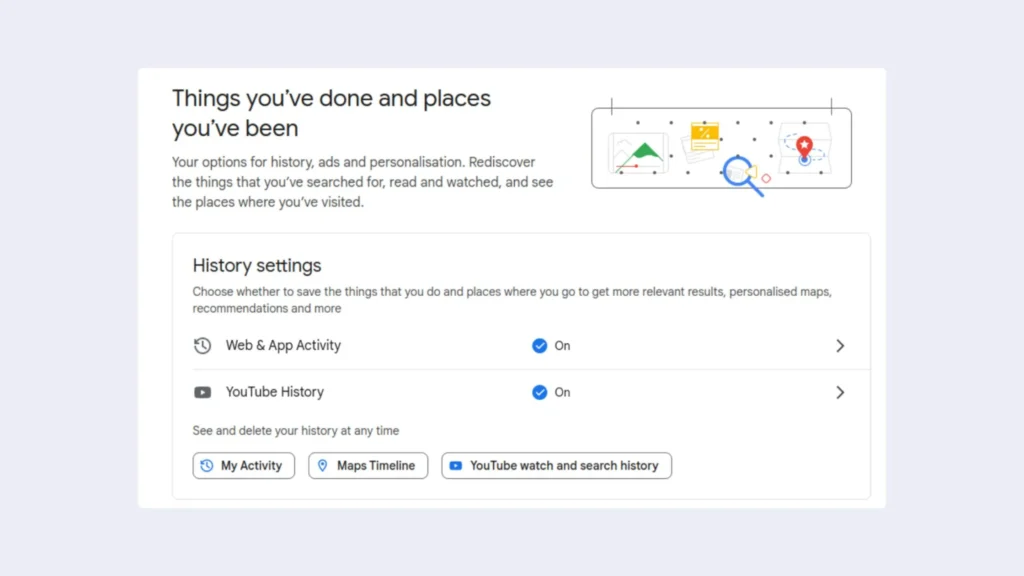
Here’s how to explore it:
- Activity & History Settings: Review your searches, websites visited, and app usage. Decide which activities or locations you want Google to save. This data influences personalized maps, search results, and recommendations.
- Personalized Ads (My Ad Center): See how Google profiles you for ad targeting. You can view assigned interests and topics, and toggle ad personalization on or off.
- Google Maps Timeline: Track your past locations, routes, and travel durations. This shows where you were on specific days and helps understand the location data Google collects.
- Data from Apps & Services: Check what content and settings are tracked from the Google services you use, including third-party apps linked to your account.
- Linked Google Services: Discover which services are connected to your account and how data is shared between them.
- Download or Delete Your Data: Use Google Takeout to export a copy of your stored data. You can select which services and content to download. You can also choose to delete specific data or entire categories from your account.
Risks & Implications of Google Knowing Too Much
Google’s data collection brings many benefits, but it also creates risks. Knowing these risks can help you protect your privacy.
- Targeted Ads & Profiling: Google builds detailed profiles with your interests, age, gender, and behavior. This makes ads more relevant, but it also means your personal preferences are tracked and sold.
- Risk of Data Breaches: Google stores huge amounts of personal data. If a breach happens, your information could be exposed. Google has strong security, but no system is fully safe.
- Loss of Privacy: Google tracks searches, locations, and app usage. Over time, this creates a detailed picture of your daily life. It can feel intrusive and reduce your anonymity.
- Government Access: Google may share your data with governments or law enforcement when required. In some countries, this information can even be shared across borders.
- Behavioral Influence: By knowing your habits and interests, Google controls what you see in search, news, and video feeds. This can influence your opinions or reinforce biases.
- Third-Party Sharing: Some of your data is shared with advertisers and partners. This expands Google’s ecosystem but also increases the risk of your information spreading beyond your control.
These risks show why it’s important to adjust privacy settings, reduce unnecessary sharing, and use tools like VPNs or privacy-focused browsers to stay in control.
How to Delete the Information Google Already Stores About Me
Google provides tools to view, manage, and delete the data it collects about you. Here’s how to take control step by step:
Use Google My Activity to Clear Search, YouTube, and App Data
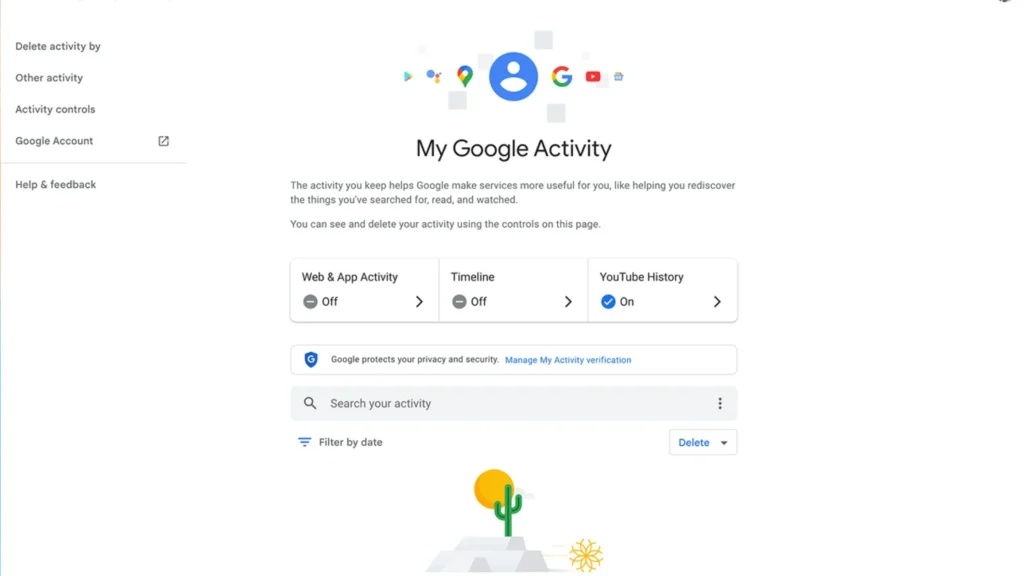
Your searches, websites, and app activity are stored in My Activity. You can review and delete them anytime:
- Go to Google My Activity and sign in to your account.
- Review your Web & App Activity. You’ll see searches, websites visited, and apps used.
- Click Delete activity by and choose a time range (Last hour, Last day, All time, or Custom range).
- Confirm deletion to remove stored activity.
Manage or Delete Location History
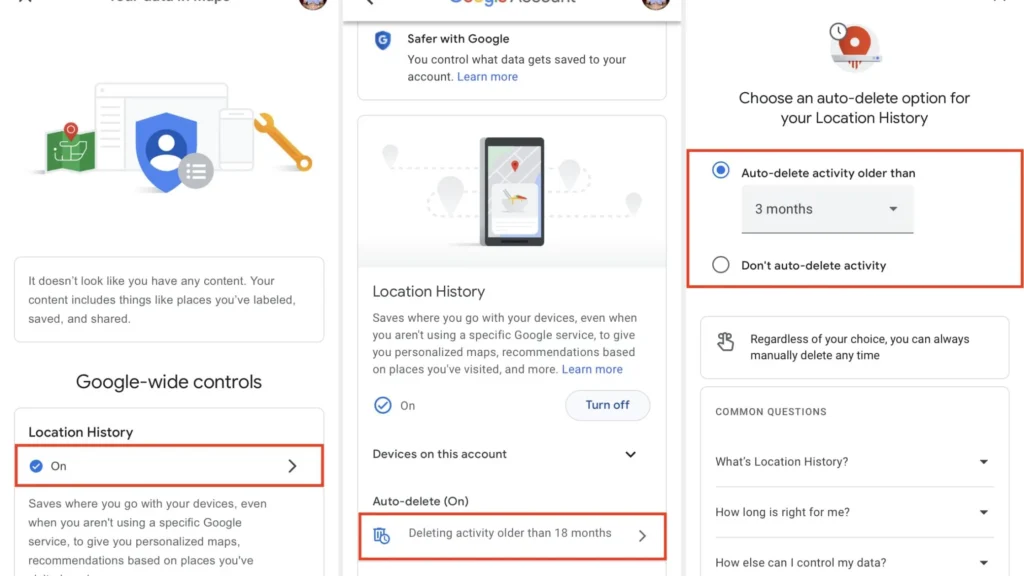
Google Maps saves your location data and travel history. You can choose to clear this or pause tracking:
- Open Google Maps Timeline while signed in.
- View your recorded locations and travel paths.
- Click Settings → Delete all Location History to remove all tracked locations, or select specific dates to delete.
- You can also pause Location History to prevent future tracking.
Remove Data from Google Ad Settings
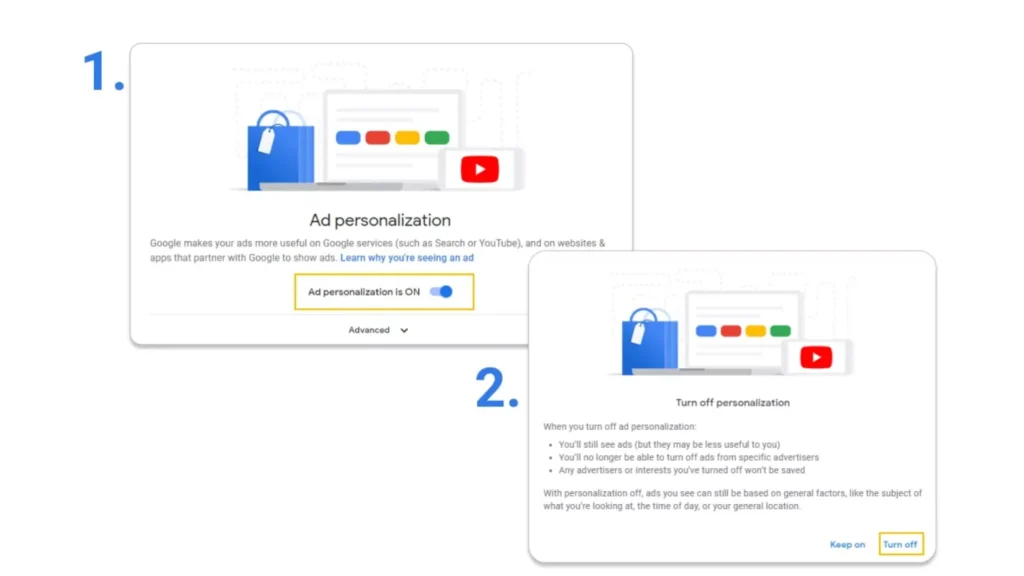
Google builds an ad profile based on your activity. You can edit or remove this information:
- Go to Google Ad Settings to see the profile Google has built for you.
- Toggle Ad Personalization off to stop Google from using your data to target ads.
- Review topics and categories assigned to you and remove any you don’t want associated with your account.
Download & Then Delete Your Google Data (Google Takeout)
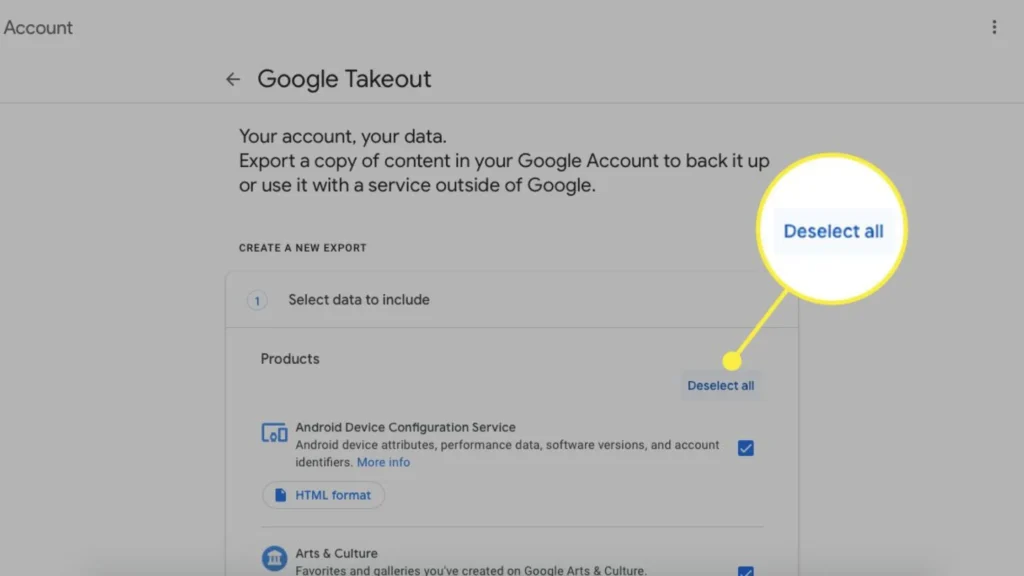
If you want to keep a copy before deleting, Google Takeout lets you export your data safely.
- Visit Google Takeout to download a copy of your stored data.
- Select the data you want to export (Gmail, Drive, YouTube, Maps, etc.).
- After downloading, you can delete the corresponding data from your account for privacy.
Adjust Auto-Delete and Data Retention Settings
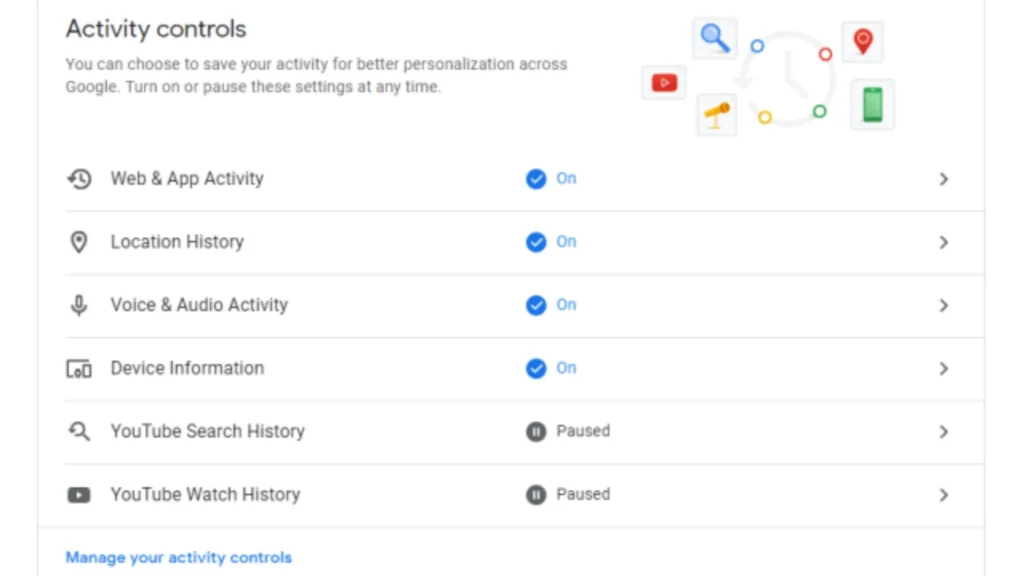
To avoid data piling up again, set auto-delete schedules:
- In Google My Activity, go to Activity Controls.
- Set automatic deletion of data after 3, 18, or 36 months for Web & App Activity, YouTube History, and Location History.
- This ensures older data doesn’t accumulate without your knowledge.
How to Limit What Google Knows by Using TurisVPN
TurisVPN is a privacy-focused Virtual Private Network (VPN) that helps you browse the web anonymously. By encrypting your internet connection and masking your IP address, TurisVPN prevents Google (and other companies) from tracking your location, device info, and online activity.
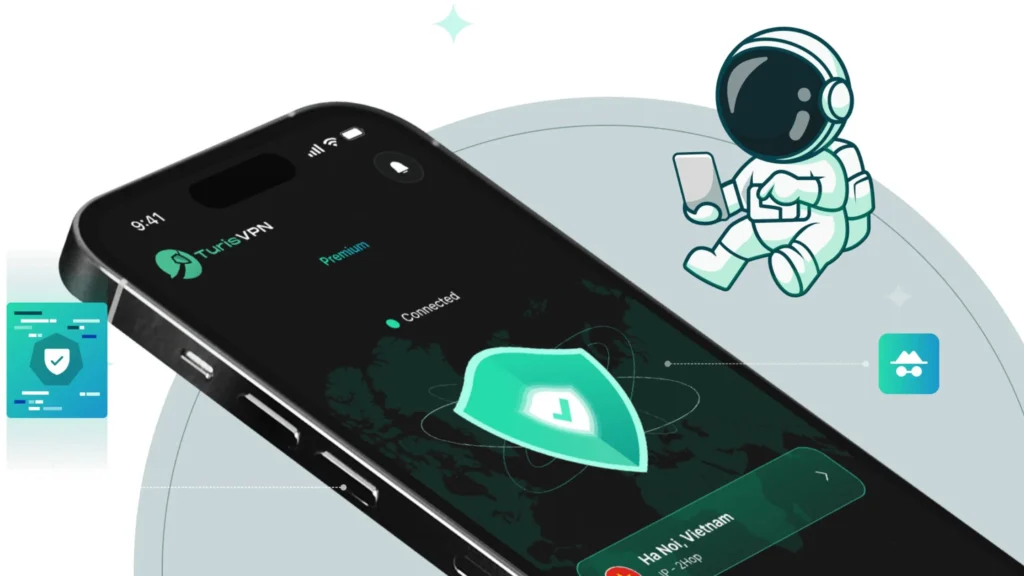
Using TurisVPN can reduce the amount of personal data Google collects while you browse, search, or watch YouTube. Here’s how to set it up and use it effectively:
- Step 1: Download & Install TurisVPN: Get the app for your device from the official website or app store.
- Step 2: Sign In & Connect: Log in and choose a server (e.g, Singapore VPN).
- Step 3: Browse Safely: Open Google services; your IP, location, and traffic are hidden.
- Step 4: Combine With Google Settings: Pause Web & App Activity, turn off Location History, and disable Ad Personalization.
Another Way to Limit What Google Knows
You don’t have to give Google full access to your digital life. You can greatly reduce the amount of data collected about you. Below are 4 practical ways you can take.
Adjust Google Account Settings
Go to Data & Privacy in your Google account and disable tracking options such as Web & App Activity, Location History, and YouTube History. This prevents Google from continuously logging new activity.
Delete / auto-delete past activity
In My Activity, you can manually delete old searches, YouTube views, and app activity. You can also enable auto-delete schedules (e.g., every 3–18 months) to automatically remove past data.
Use privacy tools
Install browser extensions like ad-blockers, anti-tracking tools, and secure browsers. These help reduce the amount of data Google can collect while you browse online.
Use privacy-focused search
Switch to search engines that don’t track your activity, such as DuckDuckGo, Qwant, or Startpage. These engines do not create user profiles or log your searches, protecting your privacy.
Bottom Line
Google collects a large amount of data about you. This includes your searches, browsing habits, location, device usage, and interests. But it also creates serious privacy concerns.
You can protect yourself by using TurisVPN. Adjust your Google account settings, delete past activity, and try privacy-focused search tools.
FAQs
Q1. Can I completely stop Google from collecting my data?
No. If you use Google services, some data will always be collected. But you can reduce tracking. Adjust your account settings, use TurisVPN, delete old activity, and try privacy-focused alternatives.
Q2. Does using Incognito prevent Google from knowing me?
Not fully. Incognito only blocks your browser from saving history and cookies. Google can still track you through your account, IP address, and other signals. For stronger privacy, combine Incognito with a VPN.
Q3. How accurate are Google’s inferred profiles?
Google’s profiles are usually very detailed. They often reflect your interests, demographics, and online behavior. Still, they are not perfect. Sometimes Google misreads your activity or assigns the wrong interests.