If you want to know how to turn on NSFW on Twitter in 2025, you’ve come to the right place. Many users want to unlock explicit content or share their own NSFW posts on Twitter, but find it tricky since Twitter’s default sensitive content filters.
This guide explains clearly how to change settings to see NSFW content on Twitter, and how to post your own NSFW content safely. Whether you use a desktop, Android, or iPhone, we cover everything you need to know. For privacy, we also discuss using TurisVPN for secure browsing.
What Does NSFW Mean on Twitter (X)?
Understanding what NSFW is is crucial when you seek to allow adult content on Twitter. NSFW stands for “Not Safe For Work.” It labels materials that may be inappropriate in work or public settings due to nudity, sexual content, or graphic themes.
On Twitter (X), NSFW content is media flagged as sensitive by users or the platform itself. This means tweets marked with NSFW trigger warnings like “this tweet may include sensitive content” so viewers can decide if they want to see it.
Marking content helps protect users from accidental exposure and respects community standards. NSFW on Twitter covers various media types, from images and videos to text discussions meant for mature audiences only. Users can filter these out or choose to view them if they are over 18, ensuring a safer experience.
Understanding Twitter’s Sensitive Content Policy
A common query among users is, “Why does Twitter allow sensitive content? While many platforms restrict nudity completely, X’s approach is to shield it. This is why it’s considered an open or permissive platform among mainstream nsfw social media sites. The answer lies in its commitment to freedom of expression.
Content creators take responsibility for tagging their material. The platform believes that by implementing effective filtering and age checks, it can host a wider range of content than its competitors. This means you are open to seeing age-restricted content on X once you affirm your age.
However, Twitter (X) allows adult content on Twitter with clear rules. Its policies ensure that explicit content is hidden by default but accessible for users who want to allow NSFW on Twitter. Important points of the policy include:
- Users must label posts containing NSFW as sensitive, producing warnings.
- Sensitive content is blocked from minors and filtered out in searches for users who don’t opt to see it.
- Content includes nudity, sexual acts, violence, or otherwise mature themes.
- Twitter bans illegal or harmful content like non-consensual explicit media or hate speech.
- Age-restriction tools help limit exposure to those under 18.
- The platform balances free speech with safety, letting adults control what explicit content they see or post.
- Twitter also prohibits hateful imagery that targets individuals or groups based on race, ethnicity, gender, religion, or other protected characteristics.
How to Turn On NSFW Content on Twitter (Desktop & Mobile)
This entire section serves as a practical tutorial for Twitter, detailing exactly how to adjust the sensitive content filter across all major platforms. Here’s how to get NSFW content on Twitter.
On Desktop (Web Browser)
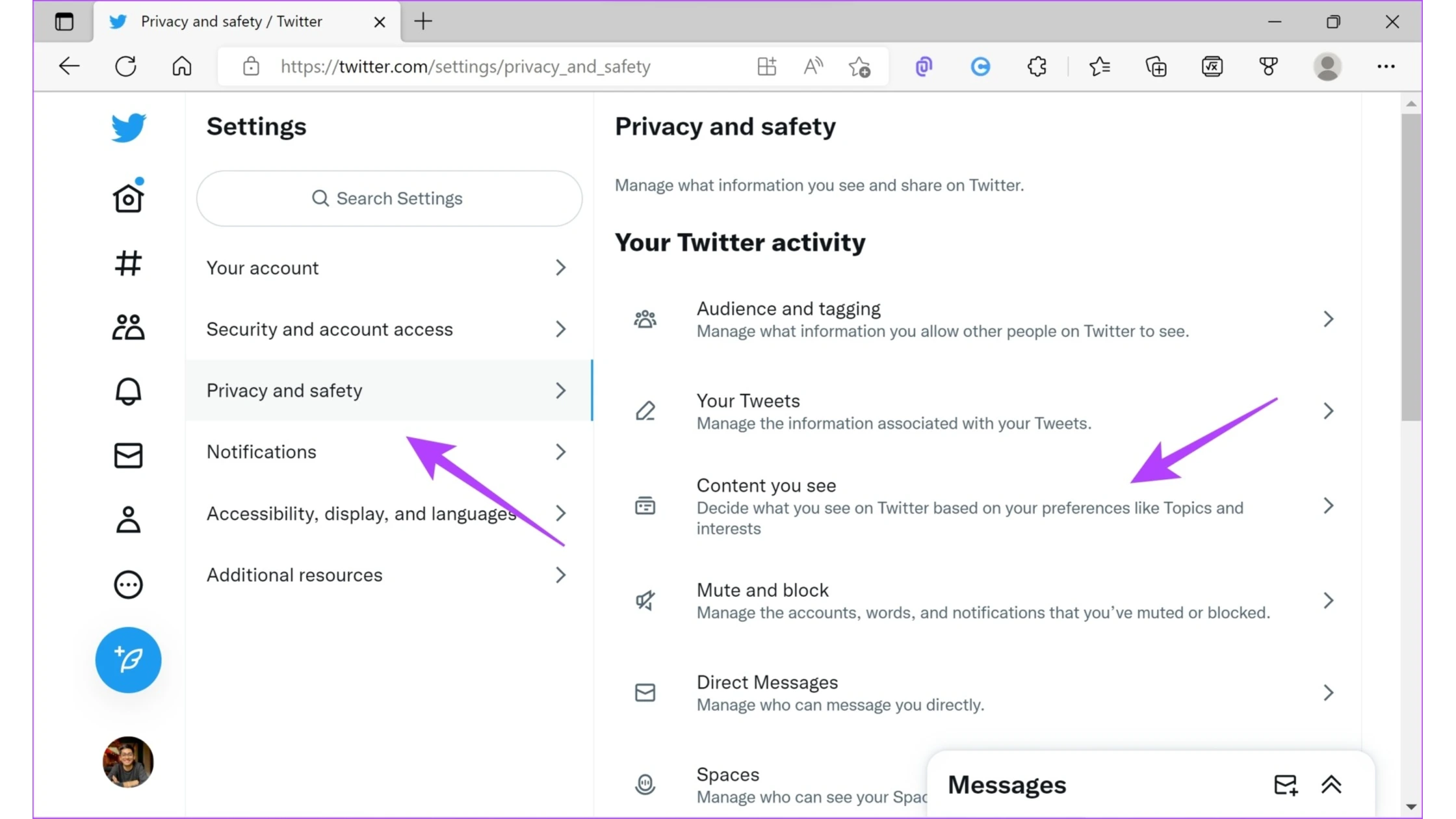
Using the desktop version is usually the easiest way to change this important setting. This is especially true if you see that Twitter does not show NSFW content on your phone app. To enable NSFW on Twitter via desktop, follow these steps:
- Log in to your Twitter (X) account on a web browser.
- Click on the “More” icon in the sidebar, then select Settings and privacy.
- Navigate to Privacy and safety > Content you see.
- Find the option labeled Display media that may contain sensitive content and check the box.
- Additionally, ensure Hide sensitive content in search settings is unchecked to see all explicit search results.
- Your feed will now start showing NSFW posts without warnings or blocking media previews.
This method works well because some mobile apps hide this setting, so desktop or browser use is often recommended for how to turn on NSFW on Twitter.
On Android App
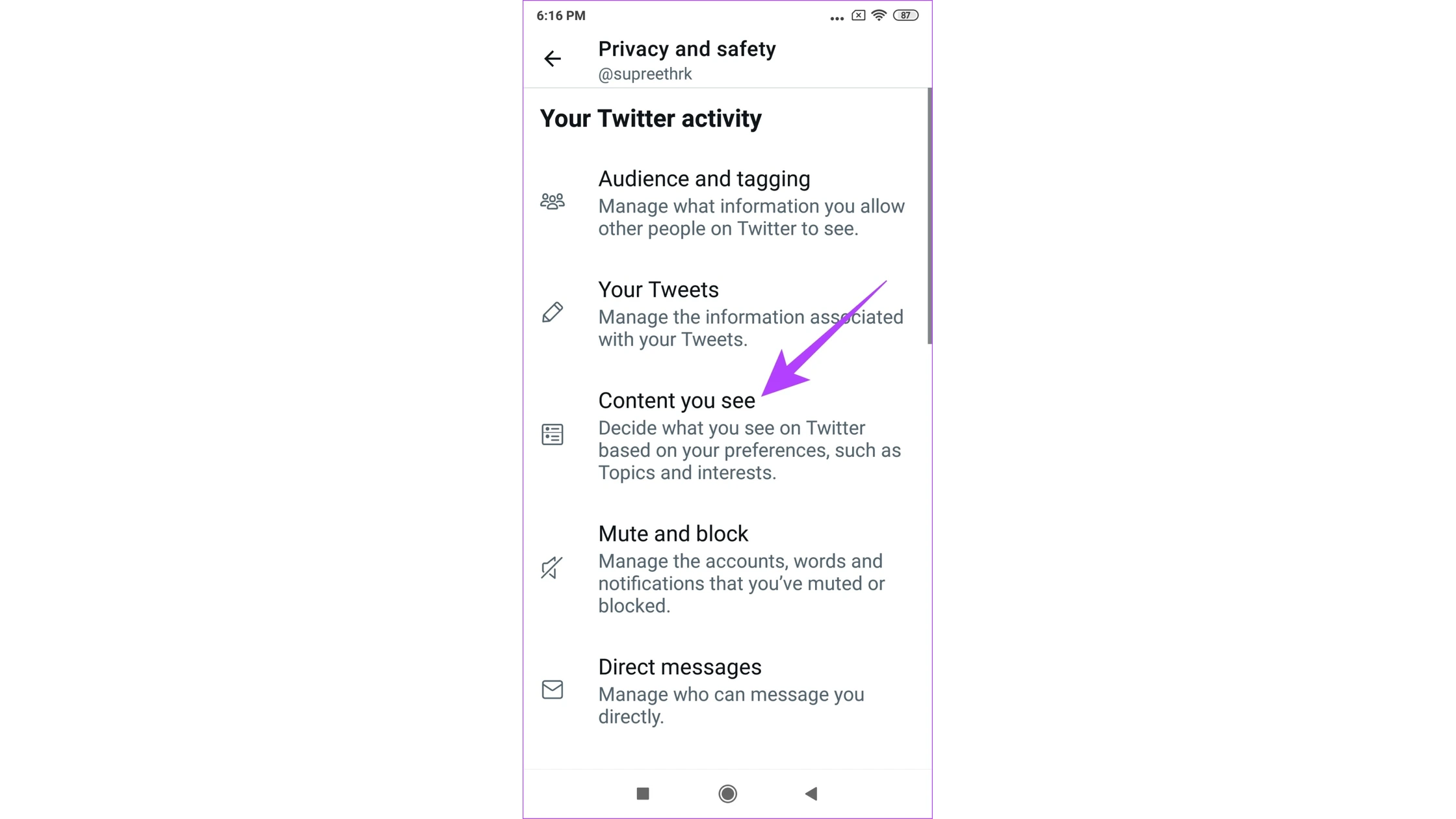
The Android app currently lacks a direct toggle for displaying NSFW content globally. However, you can:
- Access Twitter (X) via a mobile browser and follow the desktop browser steps.
- Alternatively, mark your own posted media as sensitive so others see warnings, which contributes to safe platform behavior.
- For viewing explicit content, use the browser version for full setting control.
This is the surest way to master how to turn on NSFW on Twitter on Android.
On iOS (iPhone/iPad)
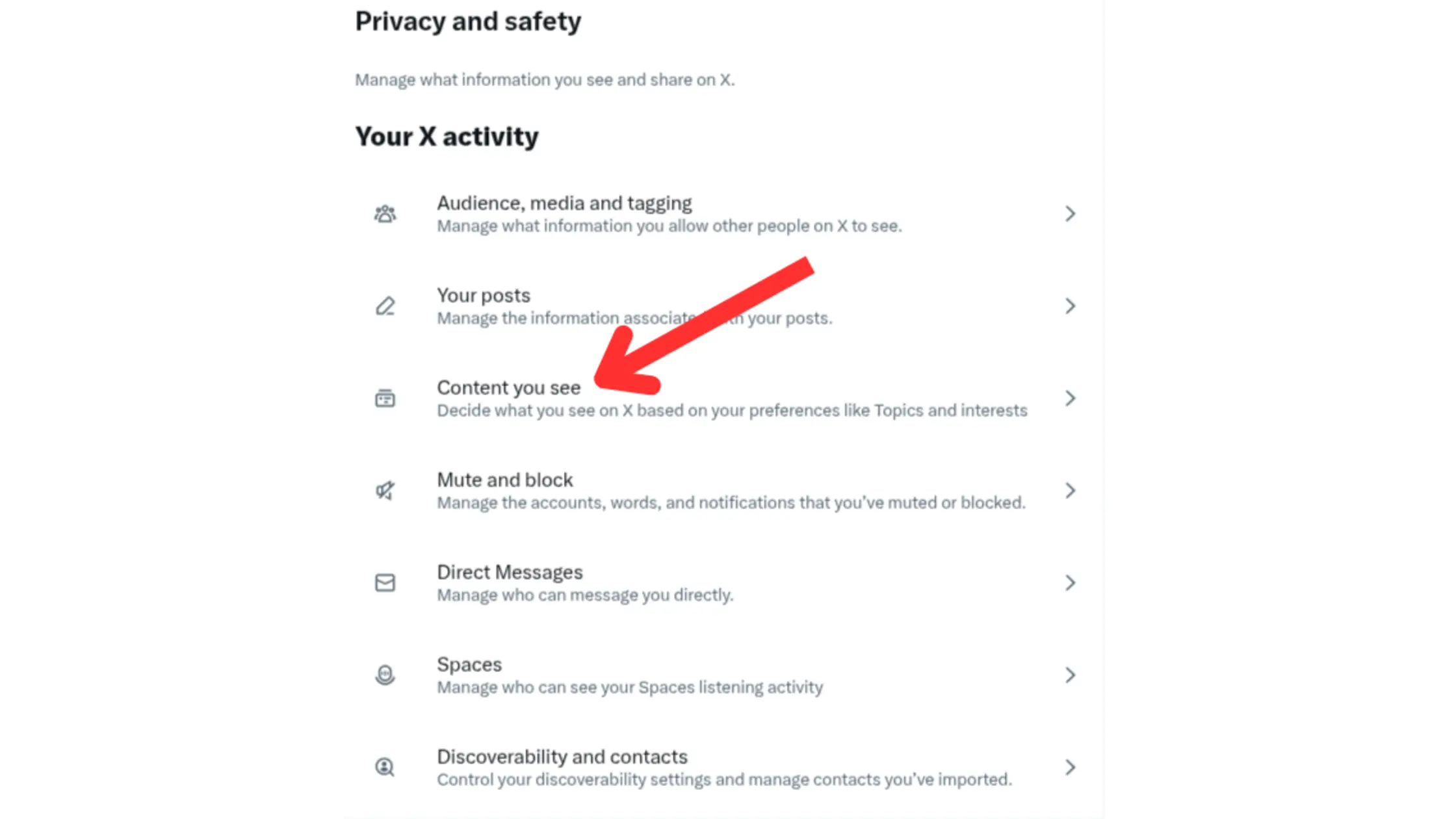
If you are looking for how to see NSFW on X settings 2025 iPhone, you must use a mobile web browser. So we recommend:
- Open Safari or another mobile browser.
- Go to x.com and log in to your Twitter account.
- Tap your profile icon, select Settings and privacy > Privacy and safety > Content you see.
- Enable Display media that may contain sensitive content.
- Adjust search settings to show explicit content by disabling Hide sensitive content.
This method effectively unlocks your ability to see NSFW on X settings 2025 iPhone and access explicit media safely from your mobile device. Understanding this step is vital to know how to turn on NSFW on Twitter on any device.
How to Allow NSFW When Posting Your Own Content
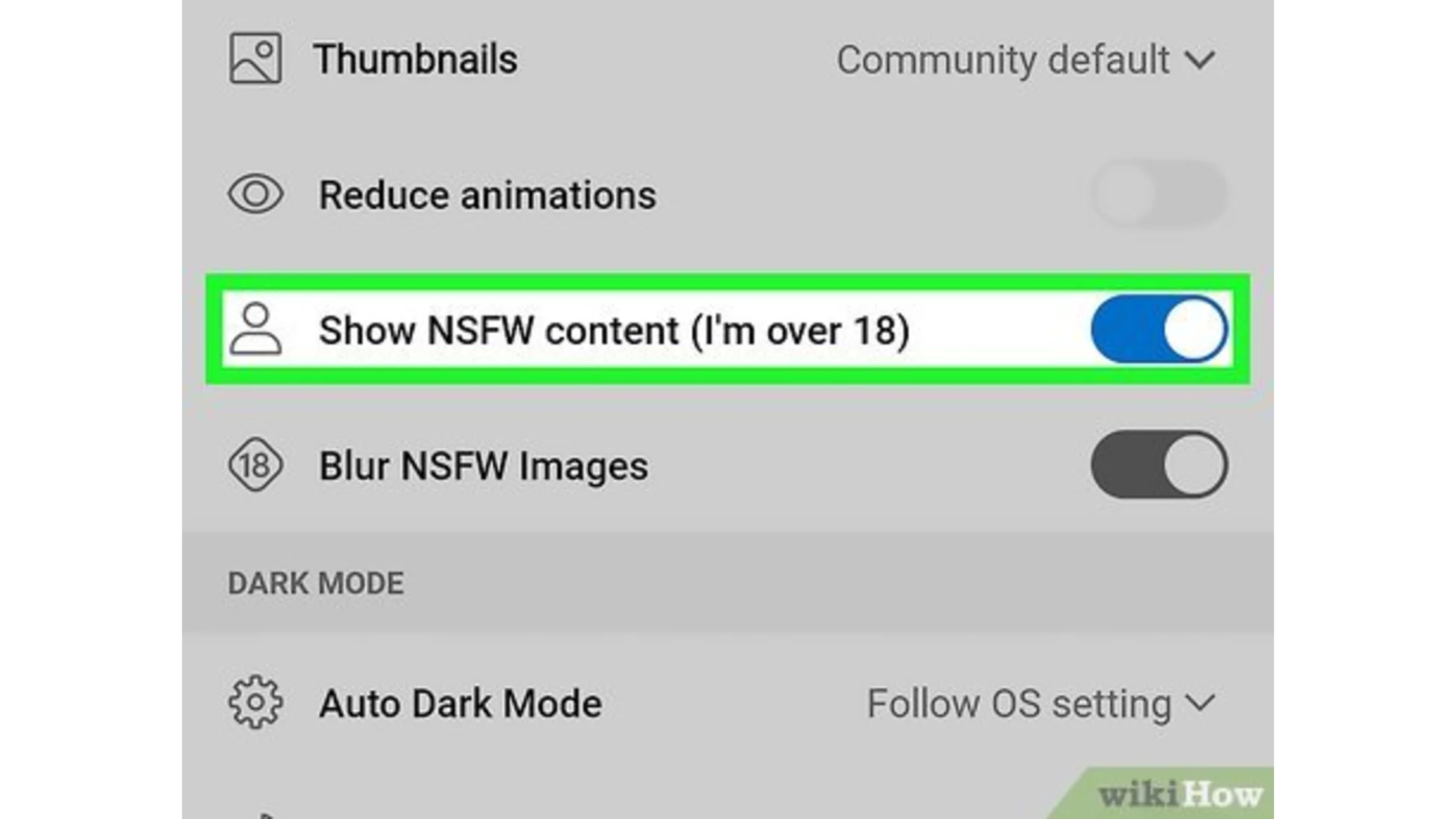
Knowing how to post NSFW on Twitter properly is as important as knowing how to view it. If you’re interested in posting NSFW material yourself, here’s how to mark your own tweets:
- When composing a tweet with media (images or videos), before posting, click the settings or edit button on your media.
- Select the option to mark the media as containing sensitive material (e.g., nudity or violence).
- You can enable a global setting in Privacy and safety > Your posts to label all your media as sensitive automatically.
This process places the “tweet may include sensitive content” warning on that post alone. By doing this, you show that you follow the content rules. This answers the question, “Does X allow NSFW?” Yes, it does, as long as you follow the guidelines. How to turn on NSFW on Twitter viewing is just the first step; proper tagging is key for creators.
Using TurisVPN to Access NSFW Content Safely
You now know how to turn on NSFW on Twitter using the account settings. However, location-based limits can still stop you from seeing content. This is especially true in countries with strict internet rules. This is where TurisVPN becomes a useful tool.
TurisVPN protects your privacy by hiding your IP address and bypassing regional blocks to give you safe access to NSFW content. It also secures your connection to prevent tracking while browsing or posting sensitive material. Here is a step-by-step guide to accessing NSFW content safely on Twitter (X):
- Download and install TurisVPN on your device.
- Log in or create a TurisVPN account.
- Connect to a VPN server in a country that doesn’t restrict NSFW content (like the US).
- Log in to Twitter (X).
- In Twitter settings, change your country to match the VPN server location.
- Go to Privacy and Safety > Content you see > Enable “Display media that may contain sensitive content.”
- Refresh Twitter to view NSFW content without restrictions.
This quick method protects your identity and bypasses regional blocks and age verification on Twitter. Check out our guides on temporarily deactivating Twitter or avoiding shadowbans to keep your NSFW activity safe and private. This entire process complements how to turn on NSFW on Twitter for maximum freedom.
Customising Your Feed After Enabling NSFW
After you have learned how to turn on NSFW on Twitter, and changed the settings to allow NSFW on Twitter in your feed. The next step is to customise your feed to suit your preferences:
- Use mute and block features to filter out unwanted users or content.
- Engage with tweets you prefer to train Twitter’s algorithm.
- Regularly check your settings because sometimes Twitter not showing NSFW can happen due to bugs or account flags.
- If you can’t see sensitive content on X despite enabling, clear caches or use the desktop version for best results.
- Adjust settings as needed to balance safety and content freedom.
For those who care about their data privacy across all social platforms, we also offer tips on how to see Instagram wrapped.
Bottom Line
Knowing how to turn on NSFW on Twitter in 2025 lets you fully control what explicit content you see or share. Twitter’s system hides sensitive posts for safety, but allows adults to switch on how to see explicit content on X easily from desktop or mobile browsers. Marking your own NSFW content keeps the platform safe and respectful.
For privacy, using TurisVPN is a smart step to browse and post securely. If your Twitter account has issues like “Twitter can’t view sensitive content”, check the account age, settings, and try different browser versions. Follow our steps carefully to enjoy NSFW media responsibly and safely on Twitter today.
FAQs
Q1. Why is my Twitter not showing sensitive content?
Twitter hides NSFW by default to protect users, especially minors. Ensure your birthdate confirms you are 18+ and enable Display media that may contain sensitive content under privacy settings. Use desktop or mobile browser versions if mobile apps block this. Persistent issues could result from account warnings or new platform rules.
Q2. How to enable NSFW on iPhone?
You must use Safari or another browser to log in to x.com. Navigate to Settings and privacy > Privacy and safety > Content you see, then enable Display media that may contain sensitive content and turn off Hide sensitive content in searches to view NSFW content fully on iOS.
Q3. How do I post NSFW content safely?
Always mark your media as sensitive before posting and activate the global option if needed. Using TurisVPN can protect your privacy. Follow Twitter’s rules strictly to avoid bans or shadowbans. Avoid posting illegal or non-consensual explicit content.
Q4. How to turn off sensitive content on the Twitter app?
To turn off sensitive content on the Twitter app, open the app and go to your profile photo. Select Settings and privacy > Privacy and safety > Content you see. Here, uncheck the option Display media that may contain sensitive content. This will hide NSFW or sensitive media from your feed.