Learning how to block someone on Snapchat is essential for keeping your digital interactions safe and private. Whether you’re dealing with spam, harassment, or want to limit someone’s access to your stories and messages, Snapchat blocking gives you quick control over your contact list.
This guide will walk you through the process, explaining options clearly and helping you deal with common issues like Snapchat won’t let you block someone. You’ll know everything you need to manage your contacts with confidence.
Differences between Blocking vs Removing Someone on Snapchat
Before blocking a user on Snapchat, it’s essential to distinguish between blocking and removing someone. It helps you pick the right privacy step.
- Blocking is the most severe action. It will prevent people from sending your Snaps, viewing your stories, or finding your account in searches. This total cut-off also includes blocking someone from your Snapchat story.
- Removing simply stops people from being on your friend list. They can still find you in a search and send you messages, allowing you to re-add them in the future.
Blocking is a comprehensive privacy measure, while removing is less strict and is used mainly for cleaning up your friend list. The choice depends on the situation. Snapchat gives you both options to choose from based on your needs.
Similar to Snapchat, we also guide our users on other platforms, such as understanding the process for how to block someone on Instagram.
3 Methods to Block on Snapchat: Step-by-Step Guide
How do I block someone on Snapchat? Here are three clear methods to block someone on Snapchat effectively.
1. Block a Friend from Your Chat List
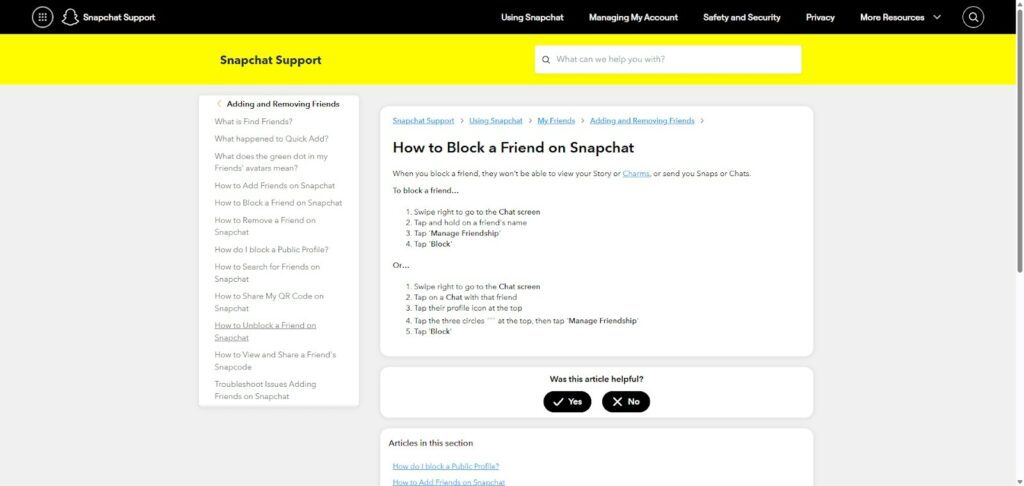
How to block friends on Snapchat 2025
Blocking a friend directly from your chat list is the quickest and most straightforward way to stop unwanted contact on Snapchat. This method is ideal for users you’ve recently interacted with or messaged.
- Step 1: Open Snapchat and swipe right to access the Chat screen.
- Step 2: Find and hold the friend’s name in your chat list.
- Step 3: Tap Manage Friendship or More.
- Step 4: Choose “Snapchat block friend” and confirm the action.
2. Block a User through the Search Bar
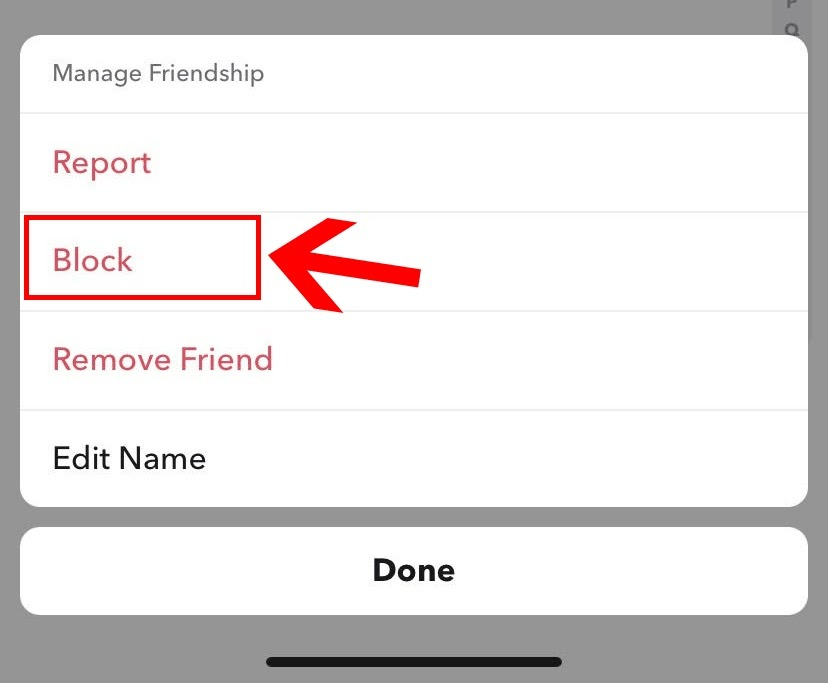
Step-by-step guide to block someone on Snapchat
Sometimes the person you want to block is not a current ‘Friend.’ For this case, you can use the search bar to block a user on Snapchat. This method lets you block any user, friend or not, and is helpful to stop spam or stalkers quickly.
- Step 1: Tap the magnifying glass (Search) icon on Snapchat.
- Step 2: Enter the username or real name.
- Step 3: Long-press their profile in the search results.
- Step 4: Tap Manage Friendship, then Block.
The steps here are quite simple. It’s akin to how users block unwanted accounts in our How to Block Someone on TikTok guide.
3. Block a User from Their Profile
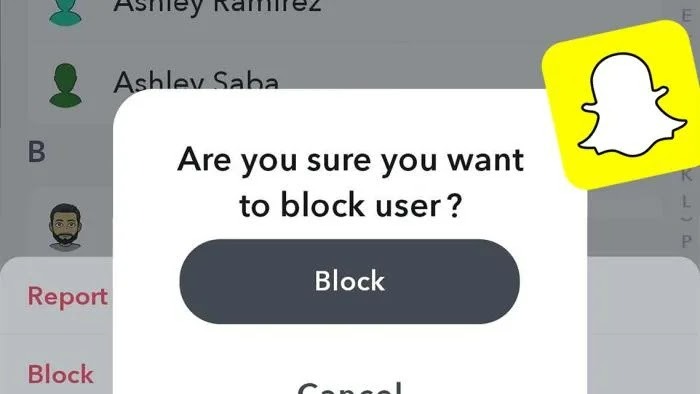
Snapchat blocking methods explained
Blocking someone from their profile page provides added context so you can review their profile details or mutual friends before deciding to block them.
- Step 1: Go to their profile by clicking their Bitmoji or username.
- Step 2: In the top right, choose the three-dot menu.
- Step 3: Choose Manage Friendship followed by Block.
- Step 4: Confirm the Block.
You can also review steps for other messaging platforms like Telegram if you are encountering similar issues there.
How to Find Your Blocked Users?
If you’ve been wondering, “I blocked someone on Snapchat, where do I find them?”, here’s how to access your blocked list:
- Step 1: Look for your profile icon on the Snapchat main screen.
- Step 2: Go to Settings (gear icon).
- Step 3: Scroll down and tap Blocked.
Here, you’ll see all users you’ve blocked. You can unblock users from this list anytime if you want to reconnect.
What Happens When You Block Someone?
Blocking a user on Snapchat has significant and instant effects. It’s meant to protect your privacy and stop all contact. When you block someone on Snapchat, the block will:
- The blocked user disappears from your friends list.
- A blocked user can’t send you Snaps or chats.
- Your stories, including private and friends-only ones, are hidden from them.
- They won’t find you in Snapchat searches anymore.
Furthermore, if you’re wondering whether your Snapchat Streak will end after blocking someone, the answer is yes. Snapchat streaks immediately stop when you block a user. This complete cut-off ensures your privacy and control over your Snapchat connections.
What to Do If Snapchat Won’t Let You Block Someone

How to block someone from your Snapchat story
Sometimes, Snapchat has glitches, and you may find that Snapchat won’t let you block someone. Here’s how to troubleshoot:
- Restart the Snapchat app and your device.
- Clear Snapchat’s cache in the app settings.
- Ensure your internet connection is stable (try switching between Wi-Fi and mobile data).
- Update to the latest version of Snapchat for bug fixes.
- If the problem persists, try logging out and back in.
If you continue to see the issue, contact Snapchat support for assistance. You can submit a request through their official support page, Snapchat Support Contact, or email them directly at [email protected]. Including detailed information about your issue will help their team respond more efficiently.
How to Tell If Someone Blocked You on Snapchat?
Snapchat does not notify you if someone blocks you, so discovering this requires some careful checking. When you get blocked on Snapchat, you won’t receive any alerts or clear messages. However, certain signs help you determine whether you’ve been blocked:
- Their username disappears from Snapchat search results when you look for them.
- You cannot send them Snaps or messages, or your attempts don’t get delivered.
- Their stories become invisible to you, even if they are usually public.
If these signs appear, it’s a strong indication that you have been blocked. Keep in mind that once blocked, you cannot add that person back on Snapchat until they unblock you.
When you realize you’ve been blocked, there isn’t much you can do to reverse it other than respect the other person’s privacy choice. You might want to check through mutual friends or use another Snapchat account to confirm, but ultimately, the best course is to move on.
Enhancing Your Privacy on Snapchat with TurisVPN
How do you block someone on Snapchat securely
You need to know how to block someone on Snapchat to manage your personal contacts. TurisVPN helps you with this by providing security for all your online activities, including social media.
Why VPN protection matters for Snapchat users
When you use Snapchat, you frequently share your data. You could also be showing your IP address to others on open Wi-Fi. A Virtual Private Network (VPN) goes through your internet connection. It hides your actual IP address and location.
For Snapchat users, this means your actual location stays hidden. Even when you share location Snaps or use public Wi-Fi, your data is safe from anyone trying to spy on you. This extra security is critical. It’s for anyone who values their privacy and data security.
How TurisVPN helps safeguard your online activity
TurisVPN gives you a strong, encrypted tunnel. It secures everything you send and receive. We send your traffic through one of our safe global servers. This makes it impossible for internet providers, governments, or bad actors to track your online steps. They can’t read your chats or information.
Your IP stays hidden whether you’re blocking a friend or dealing with unwanted attention. Here’s a simple step-by-step guide on how TurisVPN helps safeguard your online activity.
Step 1: Download and Install TurisVPN
Visit the official TurisVPN website or your device’s app store to download the TurisVPN application that is compatible with your device (Chrome Web Extension, iOS, Android).
Step 2: Create an Account or Log In
Open the app and sign up for a new account if you don’t have one, or log in with your existing credentials.
Step 3: Connect to a VPN Server
Once logged in, you’ll see a list of server locations. Choose a server based on your preference; selecting a nearby location ensures better speed.
Step 4: Activate the VPN Connection
Tap the connect button to activate the VPN. Your internet traffic will now be encrypted, and your IP address masked.
Step 5: Use Snapchat Securely
With TurisVPN active, open Snapchat. Your IP is hidden, protecting you from trackers or potential cyber threats, especially when blocking unwanted contacts or browsing stories.
Following these steps ensures your online activity is protected, making it harder for anyone to intercept or snoop on your Snapchat usage and other online behaviors.
Bottom Line
Learning how to block someone on Snapchat safeguards your privacy and helps control who interacts with you. You control your contacts completely, from chat list blocking to profile or search-based methods.
Using TurisVPN alongside Snapchat’s privacy tools gives you a stronger defense against unwanted digital attention.
FAQs
Q1. Can You Temporarily Block Someone on Snapchat?
Snapchat does not have a feature to block someone temporarily. A block stays in effect forever. It lasts until you go to your ‘Blocked Users’ list and unblock them yourself.
You could remove them as friends if you want a short break from seeing their content. This is less severe than a whole block. But only a full block guarantees they can’t contact you.
Q2. Will Blocking End a Snapchat Streak?
The answer is yes. A Snapchat Streak needs users to send a Snap to each other within 24 hours. Blocking stops the blocked user from sending or getting any Snaps from you. The Streak cannot continue, so it breaks right away.
Q3. Can Someone Add You Again After You Block Them?
No. This is the main point of a block. It stops the person from searching for or adding you again. Once you block a user on Snapchat, they cannot start contacting you at all. You must first unblock them yourself so they can add you again.
Q4. Do Blocked People Still See You in Group Chats?
Yes, blocked users can still see and send messages in group chats you both belong to. Blocking only stops direct interactions, but group chat messages remain visible to all members. To avoid contact completely, you’d need to leave the group or have the blocked person removed from it.