Bypass ISP speed limit restrictions is the only way to get the internet speed you actually pay for when your provider decides to slow you down. We know the frustration of watching a 4K movie, only to have it buffer endlessly because your Internet Service Provider (ISP) detects heavy data usage.
At TurisVPN, we believe you should control your connection, not your ISP. In this guide, we will explain exactly how throttling works and show you the most effective methods to stop it.
What is ISP Throttling and Why Does It Happen?
ISP throttling is when your Internet Service Provider (ISP) deliberately limits your bandwidth, creating a bottleneck that slows down your connection speed. It relies on Deep Packet Inspection (DPI), which enables the ISP to analyze and categorize data packets in real time. This throttling can vary from a blanket slowdown during peak hours to specific restrictions on heavy-usage apps like streaming services.
For example, your connection might load web pages instantly but buffer endlessly when you try to watch a 4K video on Netflix. This ultimately means your ISP is prioritizing its network management policies over the consistent high-speed experience you actually pay for.
ISPs often claim this is necessary to ensure “fairness” for all users. However, it often feels like a punishment for using the service you paid for. If you face constant slowdowns with specific providers, you might be dealing with Spectrum throttling issues or similar policies from other major carriers.
Knowing why this happens helps us prepare the right tools to stop it. Now, let’s see if it is actually possible to get around these blocks.
Can you Actually Bypass ISP Speed Limits?
Technically, yes, but there are strict conditions. Network analysis confirms that you can bypass ISP speed limits only when the slowdown is caused by “selective traffic shaping” targeting activities like streaming or torrenting.
If you are wondering whether a VPN can bypass an ISP’s speed limit, the answer lies in how ISPs filter traffic. Since ISPs rely on seeing your data to throttle it, the solution lies in hiding that data from them. If your ISP cannot distinguish a video stream from a web page load, it cannot apply targeted Traffic Shaping rules to it.
However, there is a caveat. If you have hit a strict monthly data cap that slows your entire connection regardless of activity, a Virtual Private Network (VPN) cannot increase your speed. In that case, the physical pipe to your home is restricted. But for the vast majority of users facing activity-based lag, masking your traffic works perfectly.
Since masking traffic works for targeted throttling, the next logical step is to confirm if your connection is actually being targeted.
How to Detect if Your ISP is Throttling Your Internet Speed

You should not assume every slow connection is the ISP’s fault; sometimes it is just a weak Wi-Fi signal. Follow this diagnostic process to find the truth.
Run a Baseline Speed Test
Start by establishing your “normal” speed without any modifications.
- Close all background apps, streaming tabs, and downloads.
- Go to a speed testing site like Speedtest.net or Fast.com. Fast.com is particularly useful because it uses Netflix’s servers. If your ISP targets streaming services, this test will likely show a lower number than a generic test.
- Record your download and upload speeds.
Run the Same Test with a VPN
Now, introduce encryption to see if it changes the ISP’s behavior.
- Open your VPN application. If you don’t have one, we recommend using the TurisVPN to ensure high-speed accuracy.
- Connect to a server geographically close to you to minimize natural latency.
- Navigate back to the Speedtest.net or Fast.com website in your browser.
- Run the test again.
Compare Results
Analyze the difference between the two numbers to determine if throttling is occurring.
- Normal Result: Your VPN speed is slightly slower than your baseline (usually by 10-15% due to encryption overhead).
- Throttling Result: Your VPN speed is significantly faster than your baseline. If your speed increases when the VPN is on, your ISP was artificially slowing down your connection. The VPN hides your activity, forcing the ISP to stop throttling you.
Test Specific Services
Sometimes generic tests don’t capture the full picture, as ISPs may target only specific high-bandwidth apps.
- Open a video on YouTube or Netflix.
- Try to load it in 4K or 1080p without the VPN. Note if it buffers.
- Turn on the VPN and reload the video.
- If the VPN eliminates buffering instantly, you have confirmed Bandwidth Throttling on the streaming service.
Check for Blocked Ports
ISPs sometimes block or throttle specific firewall ports used for gaming or Peer-to-Peer (P2P) to manage traffic.
- Check if you experience high ping in games or cannot connect to torrent peers.
- Enable your VPN. This routes all traffic through a single, open port (usually UDP or TCP).
- If your connection stabilizes, your ISP was likely restricting specific ports.
Once you have confirmed that throttling is occurring, the next step is to use the right tool to stop it permanently.
Use TurisVPN for Bypassing ISP Speed Limit
If you have confirmed that your provider is meddling with your connection, using a robust VPN is the standard solution.
Why TurisVPN is the Best VPN to Circumvent ISP Speed Limits
We designed TurisVPN specifically to handle hostile network environments. The core technology we use directly counters Deep Packet Inspection.
- AES-256 Encryption: This is the same encryption standard used by banks and military organizations. When your data is encrypted this heavily, your ISP cannot read the packets. If they cannot read it, they cannot throttle it based on content.
- Strict No-Logs Policy: We do not track your activity. This ensures that even if an ISP or government asks, we have nothing to share. For those on a budget, we even offer a TurisVPN free version that adheres to these strict privacy standards.
- No Bandwidth Caps: Unlike some services, we never limit your speed, ensuring you get the fastest connection possible.
So, does VPN bypass ISP throttling? With TurisVPN, absolutely. We mask your traffic so effectively that your ISP has no choice but to treat your connection as neutral, high-priority data.
Step-by-step to Bypass
Here is how to use TurisVPN to restore your speed:
- Download and Install: Download the TurisVPN app for your mobile phone or install the Chrome Extension on your computer.
- Log In: Open the app and sign in.
- Choose a Server: Select a server location. For the best speeds, choose the server geographically closest to you.
- Connect: Click the large “Connect” button. Wait for the status to turn green.
- Verify: Go back to Fast.com. You should see your speed improve if you were being throttled.
This process also works if you need to hide activity from ISP eyes entirely, keeping your browsing history private. While a VPN is the best tool, users often ask if there are other ways to fix this without paying for a subscription.
Another Free vs Paid Methods to Bypass ISP Speed Limit
If you want to stop ISPs from slowing down the internet, you have choices. However, you must understand the trade-offs. Not all methods are safe, and some “free” fixes come with hidden costs, such as privacy risks.
Free Methods
- Changing DNS Servers
- How it works: You switch your Domain Name System (DNS) from your ISP’s default to a public one like Google (8.8.8.8) or Cloudflare (1.1.1.1).
- Pros: Completely free; easy to set up; can bypass basic website blocks.
- Cons: It does not encrypt your traffic. Your ISP can still see that you are on YouTube and throttle you. It solves routing issues, not throttling.
- Best For: Users facing slow website loading times, not streaming throttling.
- Proxy Servers
- How it works: Intermediary servers act as a middleman for your browser traffic.
- Pros: Free; hides your IP address for simple browsing.
- Cons: Most free proxies are slow, unreliable, and often sell your data. They rarely support high-speed streaming.
- Best For: Accessing simple blocked text websites, not for video.
Paid Methods
- Upgrading Your ISP Plan
- How it works: You pay your ISP more money for a “Business” or “Gamer” tier that promises no throttling.
- Pros: Official and stable; no extra software needed.
- Cons: Very expensive (often costs an extra $50–$100/month). It rewards the ISP for bad behavior.
- Best For: Businesses that need a contractually guaranteed speed (SLA).
- Premium VPN (TurisVPN)
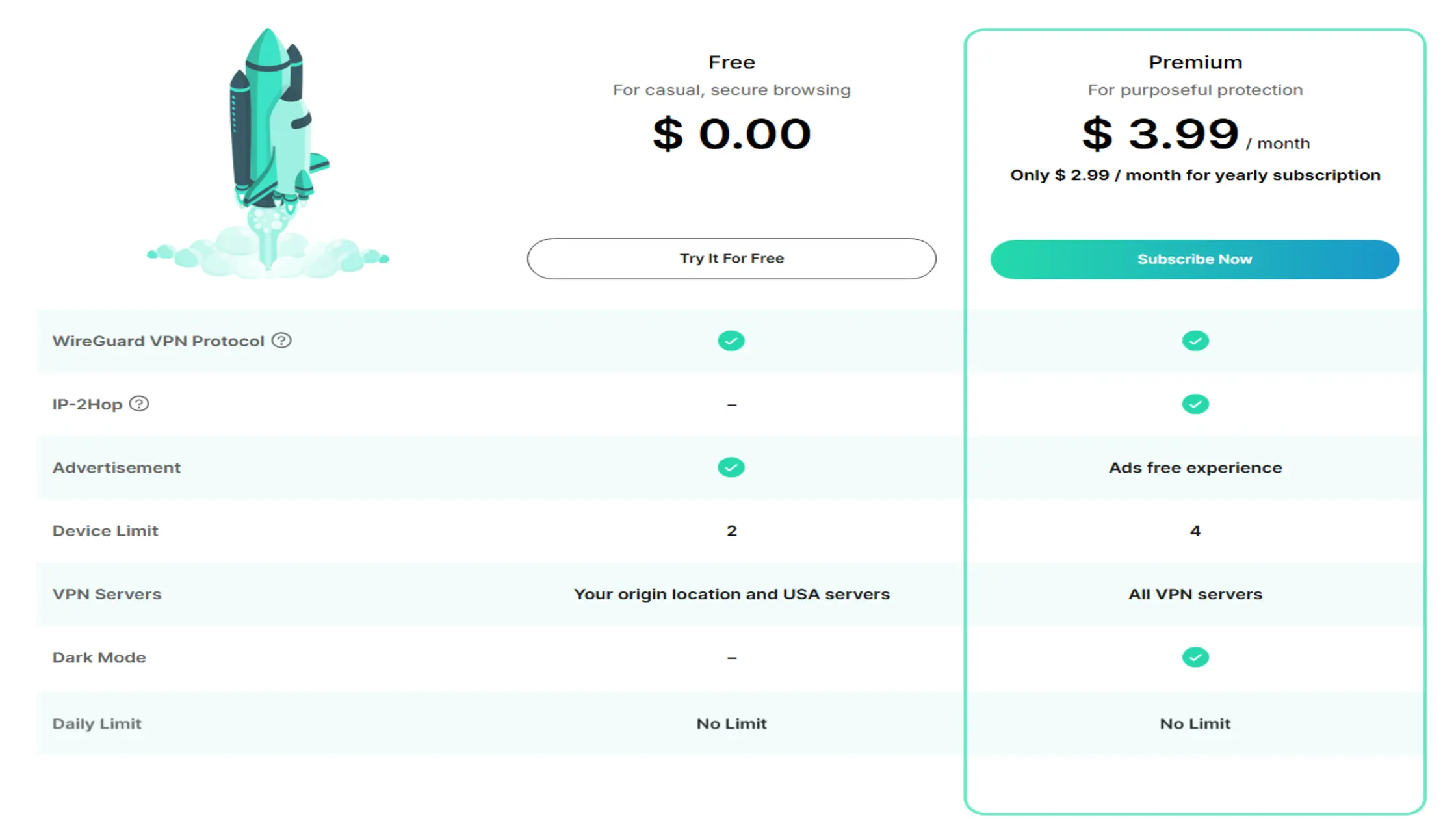
- How it works: Encrypts all device traffic to bypass ISP speed limit detection.
- Pros: Fixes throttling, improves privacy, and secures public Wi-Fi.
- Cons: Monthly subscription cost (only $3.99/month, significantly cheaper than a plan upgrade).
- Best For: Streaming, gaming, and total privacy.
Choosing between these depends on whether you value saving money or solving the problem effectively. For most, the VPN route is the only one that truly works against DPI.
Bottom Line
To bypass ISP speed limit controls is to reclaim your digital rights. ISPs use sophisticated methods like DPI to manage their networks, often at the expense of your entertainment and productivity. While you can try changing your DNS or using free proxies, these methods rarely fool modern ISP tracking systems.
The only reliable way to stop Net Neutrality violations and selective throttling is encryption. By using TurisVPN, you make your traffic invisible to your provider, forcing them to deliver the full speed you pay for.
FAQs
Q1. How Can I Detect if My ISP is Throttling Specific Services Like Netflix?
To confirm this, run a speed test on Fast.com (owned by Netflix) and then run one on Speedtest.net (generic). If Speedtest.net shows 100 Mbps but Fast.com only shows 5 Mbps, your ISP is specifically targeting Netflix traffic. You can also turn on TurisVPN and check Fast.com again; if the speed jumps up, you have proof of throttling.
Q2. What Are Safe Alternatives to Bypass Throttling Without a VPN?
There are very few safe alternatives that actually work against modern throttling. Changing DNS servers is safe but often ineffective against speed limits. Using a proxy is an option, but often unsafe due to data logging.
For instance, if you are specifically looking for a way to bypass iPhone restrictions on ISP speed limits without an app, your options are severely limited. The safest non-VPN method is negotiating a “static IP” or business line with your ISP, but this is costly.
Q3. Is bypassing ISP throttling illegal?
No, it is generally not illegal. You are paying for a certain bandwidth, and using tools like a VPN to access that bandwidth is your right. You are simply encrypting your data for privacy, which prevents the ISP’s automated systems from categorizing and slowing it down. However, you must always adhere to your ISP’s terms of service and local laws regarding illicit activities.