





Skip to content
Home Blog
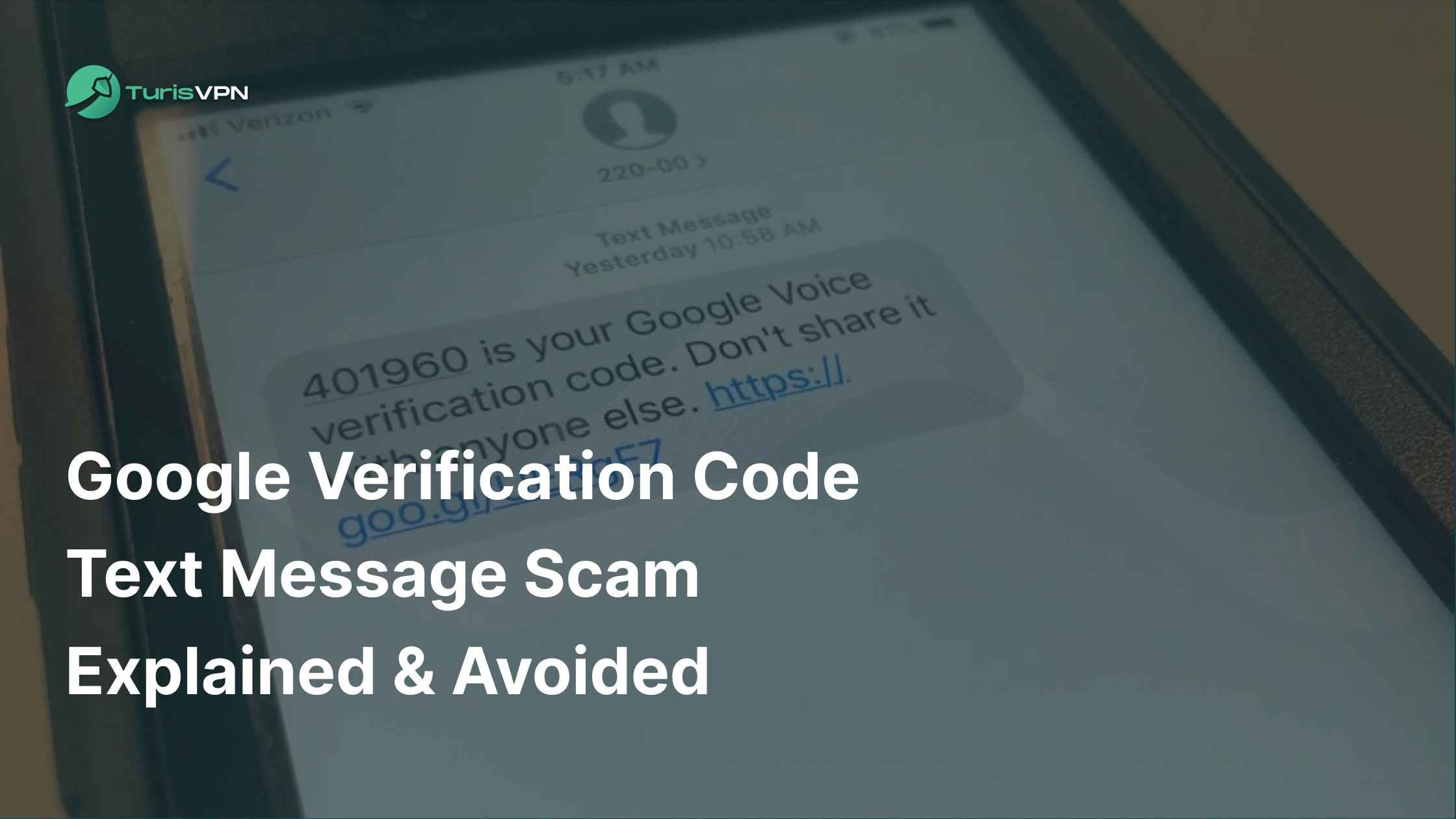
Google Verification Code Text Message Scam Explained & Avoided

Google Verification Code Text Message Scam Explained & Avoided

Steven Chan
Steven Chan
17 October 2025
9 minutes read
Google Verification Code Text Message Scam Explained & Avoided

The digital world offers convenience, but it also harbors risks. In 2024, the Federal Trade Commission (FTC) reported that consumers lost $470 million to scams initiated via text messages. Alarmingly, 60% of identity theft cases reported to the Identity Theft Resource Center (ITRC) in 2023 were linked to Google Voice scams. 

One increasingly common threat is the Google verification code text message scam. These seemingly legitimate texts can trick you into compromising your security. As seasoned experts in digital safety at TurisVPN, we’ve broken down this scam. 

In this guide, we’ll explain what a Google verification code is, how scammers misuse it, and what steps you can take to protect your online security.

What Is a Google Verification Code Text Message?

What Is a Google Verification Code Text Message

A Google verification code is a short, six-digit one-time password (OTP) that Google sends to you, usually via text, email, or through the Google app, to confirm your identity. These codes are part of Google’s security measures, often used during:

  • Sign in from a new device or location.
  • Password changes or account recovery.
  • Enabling or disabling two-factor authentication (2FA).
  • Setting up services like Google Voice.

When you see a message like text from Google verification code, it typically includes a code and a short warning not to share it. Essentially, it is an added layer of protection that ensures you are the legitimate account owner.

However, scammers have turned this protective tool into a trap. They trick people into sharing their code, enabling them to hijack accounts or launch Google Voice scams.

Why Did I Get a Google Verification Code I Didn’t Request?

If you receive Google verification code without requesting it, it’s a huge red flag. In most cases, it means one of the following:

  • Someone mistyped their phone number while trying to log in or recover their Google account, and yours was entered by mistake.
  • A scammer is actively trying to break into your account. They may already have your password and are waiting for you to hand over the verification code.
  • Your personal details might have been leaked in a data breach.

Legitimate codes from Google typically come from 22000 text Google verification code. But scammers can spoof messages that look real. If you are getting Google verification code texts repeatedly, it’s a strong signal that your account is being targeted. In some cases, automated spam systems pretend to be Google, creating confusion about whether it’s a fake Google verification code or a genuine one.

How to Tell if a Google Verification Code Text Message Is a Scam

Understanding what a Google verification code is the first step. Knowing how to differentiate a genuine alert from a fake Google verification code text is crucial for protecting your online identity.

According to the Federal Trade Commission (FTC), Americans lost $470 million in 2024 to text-based scams, a five-fold increase from 2020. 

Let’s go through the main red flags that signal a verification code text may be fake.

1. Unexpected or Unrequested Codes

If you weren’t trying to log in, recover your account, or change any Google settings but suddenly received a code, treat it as suspicious.

A legitimate Google verification code only appears after you initiate a request yourself on Google’s sign-in page. Receiving a random code out of nowhere usually means that someone else is trying to access your account using your email or phone number.

2. Requests to Share the Code

Requests to Share the Code

Google will never call, text, or email you asking for the code. If someone contacts you, whether through phone, text, email, or even social media, and asks you to “confirm” or “verify” the code, it’s 100% a scam.

This tactic is common in Google Voice scams. A fraudster might pretend to be interested in buying something you listed online. They’ll ask you to share the code “to prove you’re real”. If you hand it over, they can create a Google Voice number linked to your identity.

3. Messages Containing Suspicious Links or Hyperlinks

According to a 2025 study published on arXiv titled “An Overview of 7726 User Reports: Uncovering SMS Scams” (August 2025), researchers analyzed over 1.3 million user-submitted SMS reports sent to the “7726” spam-reporting system. They found that 40.27% of those texts were identified as scams, and a large portion included malicious hyperlinks designed to steal login credentials or personal information.

These links often lead to phishing sites that perfectly mimic Google’s login page, tricking victims into entering their email and password. Once credentials are captured, attackers can access Gmail, Google Drive, and even payment information linked to Google Pay.

Remember, a legitimate Google verification code message includes only two things:

  • The numeric verification code itself.
  • A brief reminder such as: “Do not share this code with anyone.

Nothing more. 

If the text includes a hyperlink, such as “Click here to confirm” or “Cancel request by clicking this link”, it’s malicious.

4. Urgent or Threatening Language

Scammers rely on fear to push quick action. They might use lines like:

  • “Your account will be suspended in 5 minutes unless you verify now”
  • “Immediate action required to prevent permanent lockout”

These messages are designed to bypass your judgment and make you react emotionally. A real text from Google verification code never threatens you – it simply delivers the code.

5. Unexpected Sources or Phone Numbers

Fake Google verification code sent from unknown phone number

Most legitimate codes come from short numbers such as 22000 text Google verification code. Be cautious if the message arrives from a random mobile number, an international number, or anything that doesn’t look like an official Google source.

For example, some users report getting codes from unknown +44 (UK) or +62 (Indonesia) numbers. These were all scam attempts.

6. Repeated or Frequent Verification Messages

So, what is a Google verification code for? It’s a one-time use tool – meant only for short-lived login sessions. If you receive multiple codes in a few minutes without any request from you, that’s a major red flag. Someone is likely repeatedly trying to log into your account.

According to OWASP Credential Stuffing, repeated verification attempts are a key sign of brute-force or credential stuffing attacks, often automated by bots trying stolen passwords.

What to do:

  • Change your Google password immediately.
  • Enable 2-Step Verification (2FA) with an Authenticator app instead of SMS for stronger protection.

What Happens If You Share Your Google Verification Code?

The consequences of falling for a Google verification code text message scam can be devastating. While many people think it’s “just a code,” in reality, sharing it hands over the keys to your digital life.  

Account Takeover Risks

Hacker taking control of Google account with stolen verification code

If you share the code, you’ve given the hacker the final piece of the puzzle. With it, they can instantly log into your Google account and take control. This means they can access your:

  • Gmail (read and delete private emails)
  • Google Drive files (personal and business documents)
  • Google Photos (sensitive images and videos)
  • Calendar (personal schedule and meeting details)
  • YouTube and other linked accounts

If you ever think, “I accidentally gave my Google Voice verification code”, you must act immediately. Once a scammer has it, they can link your phone number to a Google Voice account under their control. This allows them to impersonate you, receive calls meant for you, and even bypass some security checks that rely on phone verification.

Data Theft and Identity Fraud Consequences

Cybercriminal using stolen Google account for identity theft and fraud

When a scammer has access to your Google account, the danger goes far beyond email. They can:

  • Change your password and recovery options, locking you out completely.
  • Use stored data like addresses, IDs, or payment details to commit identity theft.
  • Exploit your linked credit cards or Google Pay for financial fraud.
  • Target your contacts with phishing attempts, malware links, or Steam card scams.

For example, victims have reported that after a hacker accessed their Gmail, fraudsters sent emails to friends requesting money transfers. Others discovered unauthorized purchases on their Google Pay account within hours.

This domino effect is why experts stress that a leaked verification code can be as damaging as sharing your full password.

How to Protect Yourself from a Google Verification Code Text Message Scam

Your best defense against this scam and similar cyber threats like masquerade attack is vigilance and strong security practices.
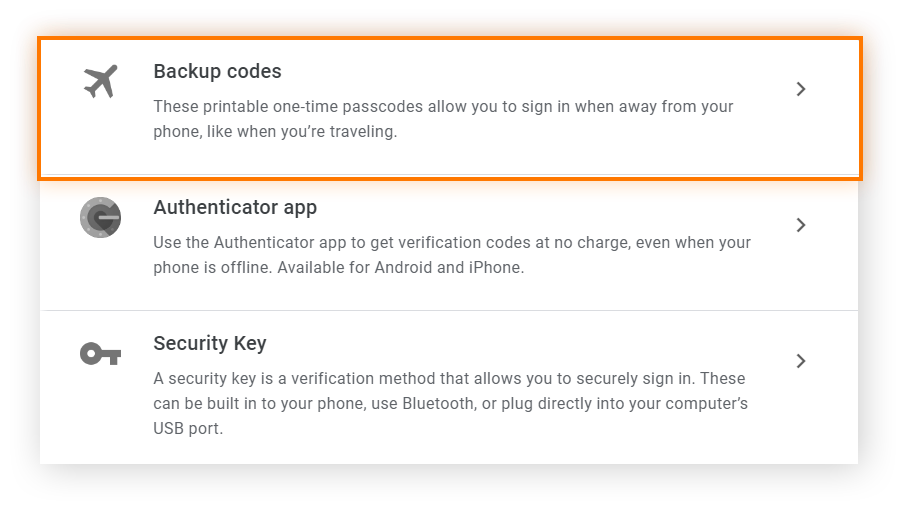
User applying security steps to protect Google account from scams

Do Not Respond or Share the Code

The most critical step is also the simplest: do nothing. If you receive a code you didn’t request, ignore it. Do not reply, do not click any attached links, and absolutely do not share the code with anyone, regardless of who they claim to be.

For example, a scammer might call you pretending to be from “Google Security” and insist that you confirm your identity by reading them the code. The moment you do, your account is theirs.

Change Your Account Password

If you’re getting Google verification code texts without requesting them, it’s likely that someone already has your password. Immediately update it to a strong, unique password that you don’t use anywhere else. In addition, you should consider using a password manager to keep track securely.

👉 Pro Tip: A strong password should be at least 12–14 characters with a mix of letters, numbers, and symbols.

Enable or Strengthen Two-Factor Authentication (2FA)
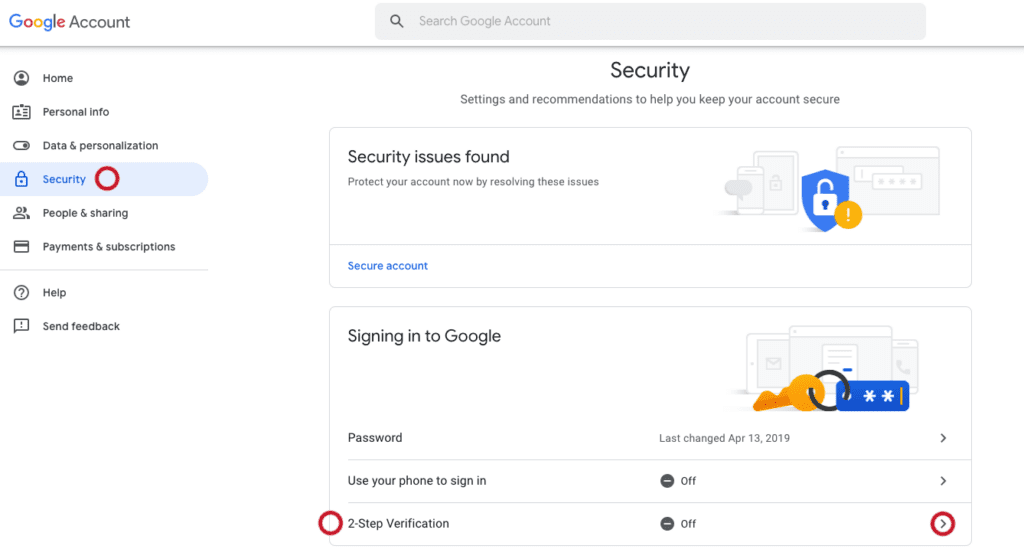
Setting up two-factor authentication on Google account

Ensure your 2FA is set up using the most secure method available, such as:

  • Google Prompt (push notification to your device)
  • A physical security key (like YubiKey)
  • Authenticator apps (Google Authenticator, Authy)

These methods make it much harder for hackers to break in, even if they know your password.

Check Account Activity

Go to your Google Security Checkup page. Review all recent logins, devices, and activity. If you see a device or location that doesn’t belong to you, act quickly by logging it out and changing your password.

Remove Suspicious Linked Devices or Apps

Scammers sometimes gain access through third-party apps. Go to your account settings and review the devices that have access to your account and revoke access for any that seem unfamiliar. Do the same for third-party apps and services.

Update Recovery Options
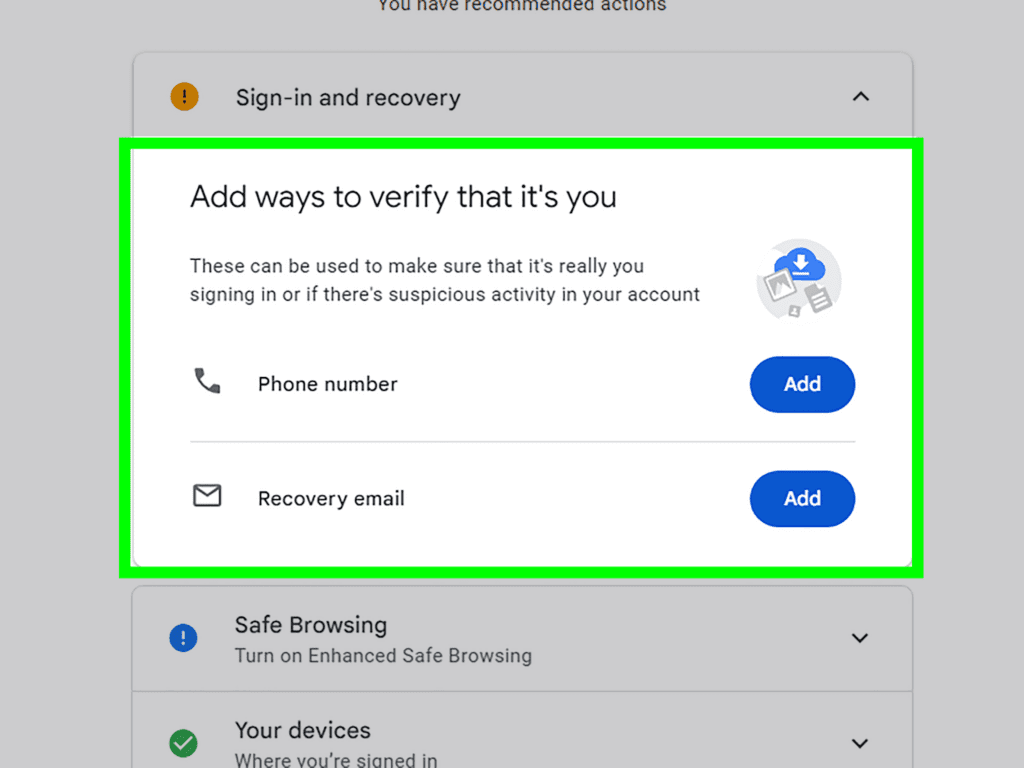
Updating recovery email and phone number in Google account settings

Make sure your recovery email and phone number are current and secure. This ensures you can get back into your account if you’re ever locked out. Avoid using emails that you rarely check or numbers you no longer own.

Run Antivirus and Malware Scans

Regularly scan your devices for malware, which could be logging your keystrokes or accessing your saved passwords. Knowing how to protect yourself is important as knowing how to access the black market or deal with unexpected calls from an area code 929 scams.

Alert Your Contacts

If you suspect that your Google account has been compromised, warn your friends, family, or colleagues immediately. Scammers often use hacked accounts to spread more fraud attempts.

For example: A compromised Gmail account can be used to send fake requests for money or links to Steam cards scams, making victims think the request came from you.

How TurisVPN Helps Protect Against Phishing and Scam Attempts

A Virtual Private Network (VPN) like TurisVPN adds a critical layer of defense:

  • Encryption: TurisVPN encrypts your connection, making it much harder for hackers to intercept your data, even if they manage to get a code.
  • IP Masking: By masking your real IP address, TurisVPN makes it harder for scammers to track your true physical location, adding an extra blanket of anonymity.
  • Secure Browsing: Our VPN can help block known malicious websites often used in phishing schemes that try to trick you into sharing codes or credentials.
TurisVPN connection protecting against scams

Here are some simple steps to stay protected with TurisVPN

Step 1: Download and Install – Visit the official TurisVPN website or your device’s app store, then download and install the app that matches your system (Chrome ExtensionAndroid, or iOS).

Step 2: Sign In Securely – Open the app and log in with your TurisVPN account. If you’re new, create an account using a strong password.

Step 3: Connect to a Server – Tap Quick Connect for the fastest, most secure server, such as Singapore VPN or Malaysia VPN. You can also manually choose a location to add another layer of privacy.

👉 Pro Tip: For maximum protection, always connect to TurisVPN before logging into Google or any account that may send verification codes. This makes it nearly impossible for phishing attackers to intercept or misuse your data.

Bottom Line

The Google verification code text message scam is a sophisticated form of phishing. Remember this: Google will never ask you for your verification code. If you are getting Google verification code alerts, it means a bad actor is at your digital door. By following the security steps outlined above and utilizing tools like TurisVPN, you can keep your digital life secure and private. Stay alert, stay safe.

FAQs

Q1. Can Google ever ask me to share my code?

No. Google will never call, email, or text you asking you to provide or “verify” your code. The warning in the text message itself says, “Don’t share this code with anyone.” Anyone claiming to be from Google and asking for the code is a scammer.

Q2. Should I ignore all Google verification codes?

You should not ignore codes you requested yourself (e.g., when logging in on a new phone). You must ignore and not share codes you received without requesting them, as these indicate a likely scam attempt.





