You might think holding the door open for someone or leaving your Wi-Fi unprotected is harmless. But that’s exactly how cyber intrusions begin. In 2025, piggybacking in cybersecurity is an issue that attackers exploit to slip past your defenses. The risks are real, and they’re growing. Our blog post will walk you through how piggybacking works, what to watch out for, and the best ways to keep your systems secure.
Key Takeaways
| – Piggybacking in cybersecurity means unauthorized access through someone else’s session or connection. – It can happen in physical spaces, Wi-Fi networks, or cloud platforms. – Common risks include data breaches, malware, and reputational damage. – TurisVPN helps protect your network and prevent session hijacking. – Strong passwords, encrypted Wi-Fi, and user awareness reduce piggybacking threats. |
What is Piggybacking in Cyber Security?
Piggybacking in cybersecurity is the act of gaining unauthorized access to a system, session, or physical space by taking advantage of someone else’s valid credentials or connection. It often happens quietly without hacking tools or technical exploits because the attacker is essentially “riding along” with a legitimate user’s access. This can look as innocent as someone following you through a secured door at work or connecting to your Wi-Fi because the password was too easy to guess.

At its core, what piggybacking means is the misuse of trust. It relies not on breaking barriers but on slipping through them while someone else holds them open, whether literally or digitally. You might hear it described as “piggybacking off of” someone, a phrase that captures the way attackers latch onto another user’s connection, permissions, or physical presence.
Though piggybacking is another term for unauthorized access, it’s distinct in how it blurs the line between carelessness and compromise. It often bypasses alarms and security systems, not because those systems failed but because someone assumed the person behind them was allowed to be there.
In a time when security breaches can start with something as small as a shared login or a held door, piggybacking remains one of the most underestimated threats in both physical and digital environments.
How Does Piggybacking Work?
At its core, piggybacking in cybersecurity is exploiting access. Attackers use a variety of techniques depending on the environment, but the common thread is simple: take advantage of someone else’s access before the system or the user notices anything is wrong. Below are the four most common scenarios where piggybacking occurs.
In Physical Security (Access Control)
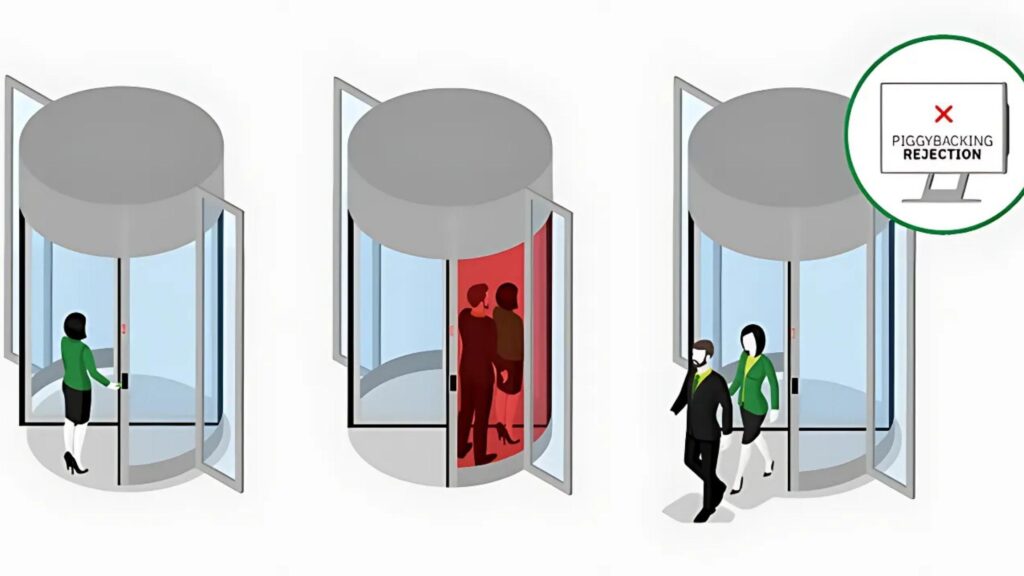
One of the oldest piggybacking techniques happens at office doors. An attacker waits outside a locked entrance. When an employee comes in, the attacker follows them. They count on someone holding the door open to be polite. It feels harmless, but it gives the attacker access without a badge.
Piggybacking is different from tailgating. In piggybacking, the employee might notice the person and let them in. They often think the attacker works there too. The attacker may act friendly, busy, or in a rush.
Sometimes they pretend they forgot their badge. Other times, they carry boxes and seem to need help. These tricks work because they feel normal in social settings. But that’s what makes them so risky.
In Computer Networks (Data Transmission)
Attackers watch how real users log into systems. Then they use that information to sneak in quietly. They may use shoulder surfing, phishing emails, or keyloggers to steal login details.
This is where piggybacking in cyber security connects with bigger threats. If attackers get valid credentials or access to an open session, they can act like the real user. They can pass through firewalls and skip login checks.
Sometimes, they don’t even need a password. If someone leaves a session open, the attacker can take over right away.
In Wireless Networks (Wi-Fi)
Wireless access points are a goldmine for piggybackers, especially when they’re not properly secured. Public or poorly protected networks offer an easy opportunity for unauthorized users to connect.
These attacks often involve connecting to open or weakly secured networks, such as a café Wi-Fi with a password posted on the wall or a home router still using the default login. Some attackers target personal hotspots, connecting without permission if the network lacks a password or encryption. Others simply guess weak credentials: “password123” or “12345678” and slip in unnoticed.
Once connected, attackers can monitor traffic, steal sensitive data, or even launch further attacks on other devices using the same network.
In Cybersecurity (Session Hijacking)
As more companies move to cloud-based tools and SaaS platforms, a new form of piggybacking has emerged. Attackers target active sessions, like an open CRM dashboard or file-sharing account, especially when left unattended on a shared or unlocked device.
In more advanced scenarios, attackers intercept session tokens or cookies, allowing them to impersonate the legitimate user without ever knowing the password. This form of piggybacking in cybersecurity can be particularly hard to detect because it doesn’t always trigger login alerts or raise suspicion.
If access controls aren’t strict, former employees or third-party contractors may also retain access to tools long after they’ve left the organization. Without proper credential revocation, they can quietly continue using systems as if they were still authorized.
Examples of Piggybacking Attacks
To understand the real-world threat of piggybacking in cybersecurity, it helps to look at how it unfolds in practice. These examples show how attackers exploit weak points in Wi-Fi setups, physical office security, and online sessions to gain unauthorized access.

Example 1: Exploiting Wi-Fi Networks for Unauthorized Access
In a busy urban neighborhood, a resident sets up their home Wi-Fi without changing the default password. A nearby attacker connects to the network unnoticed. They begin piggybacking off of the connection, using it to browse the web, stream content, and even download pirated material.
Weak router settings or open networks create an easy backdoor. In some cases, attackers go further by monitoring traffic on the network, capturing login credentials, or accessing connected devices like printers and smart home systems.
Example 2: Gaining Access to Corporate Systems via Physical Piggybacking
At a corporate office, security doors require ID badge scans for entry. An attacker in business attire waits by the door and casually walks in behind an employee who assumes they’re a coworker.
Once inside, they connect to the company’s internal Wi-Fi and plug into open Ethernet ports. This physical piggybacking technique allows them to bypass perimeter defenses entirely. In environments where no further authentication is required once inside the building, they can begin browsing internal servers or accessing sensitive files almost immediately.
Example 3: Leveraging User Sessions for Data Theft
An employee at a marketing agency steps away from their desk without locking their computer. A visitor in the office sees the open laptop and quickly sits down. In under two minutes, they forward confidential client documents to an external email and delete the evidence.
This form of piggybacking in cybersecurity doesn’t involve breaking in, it exploits open sessions and unattended devices. In more advanced cases, attackers intercept session tokens or cookies from shared machines or unsecured browsers, giving them remote access to email, cloud storage, or enterprise software tools.
Understanding the Key Differences Between Piggybacking and Tailgating in Cybersecurity
Tailgating and piggybacking are often confused because both involve bypassing security by following someone else. Tailgating usually refers to someone sneaking in right behind an authorized person, typically without their knowledge. It’s a common tactic in physical security breaches, such as office buildings or data centers.
Tailgaters don’t ask for help; they exploit inattention. In cybersecurity, tailgaters are individuals who physically infiltrate a restricted area by closely following an authorized person. Unlike digital threats, this type of intrusion targets physical access points like office doors, server rooms, or secure workspaces.

To make things clear, here’s a breakdown of how these two attacks compare:
| Comparison | Piggybacking | Tailgating |
| Victim’s Awareness | Victim may or may not be aware of what’s happening | Victim is completely unaware |
| Consent | Often includes passive or accidental cooperation (e.g., holding the door) | No consent involved at all |
| Attack Channel | Can be physical (access control) or digital (network, sessions) | Mostly physical, targeting buildings or secure areas |
| Method | Uses trust, politeness, or deception | Relies on stealth and timing |
| Tactics Used | Social engineering, exploiting human behavior | Covert following, sneaking past doors or gates |
| Common Example | Joining unsecured Wi-Fi, reusing browser sessions, gaining access via trust | Walking into a secure area behind an employee without being challenged |
Piggybacking and tailgating may seem similar, but their methods and risks differ. Don’t leave your workplace or network vulnerable. Educate your team, secure your access points, and use TurisVPN to protect your digital presence.
Risks Associated with Piggybacking

Piggybacking in cyber security opens the door to serious consequences. From stolen data to legal trouble, the damage can ripple across every part of an organization. Let’s break down the key risks you need to know:
1. Unauthorized Access and Data Breaches
When attackers piggyback into a network or system, they can access sensitive files, emails, and customer databases. These breaches may not be detected right away, giving intruders time to extract valuable information or monitor activity unnoticed. The average data breach cost is roughly $5 million, with typical costs around $200,000
2. Physical Security Threats
Piggybacking through physical access points like someone slipping in behind an employee. This can lead to theft of hardware, tampering with on-site systems, or placing rogue devices on the network. Even one lapse in access control can result in long-term vulnerabilities. Nearly 25% of business leaders reported rising physical security threats in 2023, with over half expecting that trend to continue
3. Compromise of Intellectual Property
Companies that rely on innovation and proprietary data are especially vulnerable. Attackers can steal designs, code, or confidential business strategies and sell or leak them, putting years of work at risk in just minutes.
4. Regulatory and Compliance Issues
Breaches caused by piggybacking can violate data protection regulations such as GDPR, HIPAA, or PCI DSS. Organizations found in violation may face hefty fines, investigations, and long-term legal scrutiny—not to mention the cost of notifying affected users.
5. Exploitation of Human Behavior
Piggybacking often works because people want to be polite or assume trust. These small human moments, like holding a door or leaving a session unlocked. This can be exploited by social engineers who know exactly how to blend in and manipulate others.
6. Operational Disruption
Once inside, attackers may disable systems, lock accounts, or inject malware. This can halt daily operations, delay services, and even lead to system-wide shutdowns that take days or weeks to recover from.
7. Reputational Damage
A single piggybacking incident can make headlines. Loss of trust from customers, partners, or investors can have a lasting impact on your brand. In some industries, reputation is everything; losing it may be harder to recover from than the breach itself.
How To Prevent Piggybacking in Cyber Security With A VPN?
One of the most effective ways to prevent piggybacking in cybersecurity is by using a trusted VPN (Virtual Private Network). A VPN hides your IP address, encrypts your traffic, and makes it nearly impossible for attackers to “piggyback” on your internet connection.
TurisVPN is built for tech-savvy users who don’t want to compromise on privacy or cost. The VPN uses the WireGuard protocol, offers IP-2Hop for deeper anonymity, and doesn’t track or store your browsing history. TurisVPN also gives you:
- Unlimited data usage for free
- Access to Southeast Asian servers like Singapore and Malaysia
- Easy setup across devices: Android, iOS, or even as a Chrome Extension
- Full protection even on public hotspots (cafés, airports, co-working spaces)
How To Set Up TurisVPN in 3 Steps
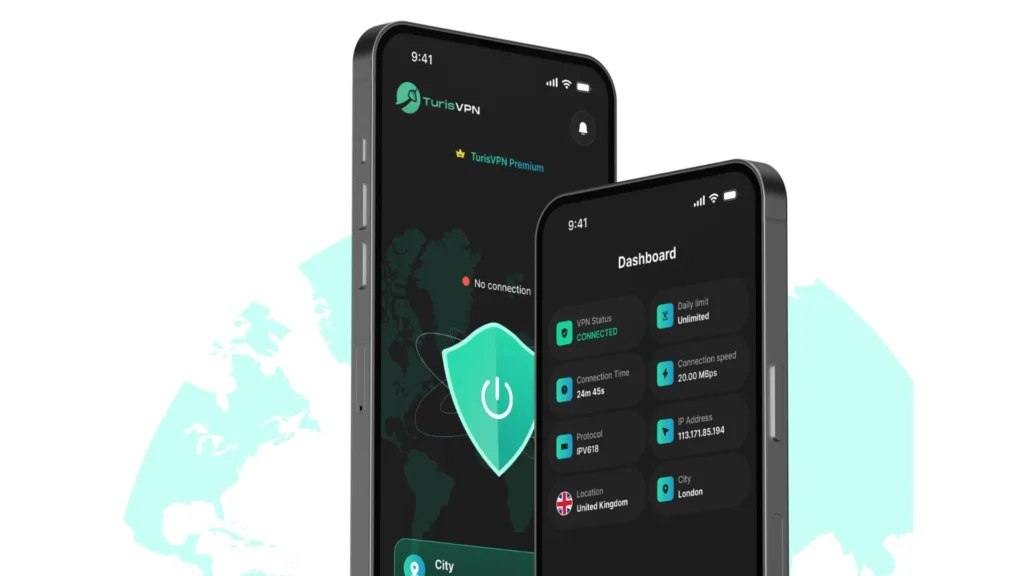
- Step 1: Download the app from Chrome, Android, or iOS store.
- Step 2: Choose your plan – free or premium (both offer strong protection).
- Step 3: Connect to a secure server – we recommend starting with Singapore for speed and stability.
Once connected, your IP address is masked, your session is encrypted, and your data is secured. By using TurisVPN, you’re locking the digital door before attackers get the chance to follow behind.
Other Methods To Keep You Safe From Piggybacking
VPNs are a solid first line of defense; you should combine them with other security practices to prevent piggybacking in cybersecurity, especially over home and office networks.
Use a Strong Wi-Fi Password
Avoid using simple or predictable passwords like “12345678” or your name. A strong password includes a mix of letters, numbers, and symbols. Change it every few months to stay ahead of unauthorized access.
Change the Default Router Login Credentials
Many routers come with default usernames and passwords like “admin” or “password.” Attackers can easily guess these. Log in to your router settings and change them to something secure and unique.
Enable WPA3 or WPA2 Encryption
Ensure your Wi-Fi uses WPA3 or at least WPA2 encryption. These are modern security standards that make it difficult for outsiders to intercept or piggyback on your connection.
Turn Off Remote Router Management
Remote management allows you to access router settings from anywhere, but it also opens up a potential backdoor. Unless you need this feature, turn it off through your router settings.
Keep Your Router Firmware Updated
Manufacturers regularly release updates to fix vulnerabilities. Log into your router dashboard once a month and check for firmware updates. It only takes a few minutes, but it strengthens your defense.
Monitor Connected Devices Regularly
Check your router’s connected devices list to spot unfamiliar users. If you see a device you don’t recognize, change your Wi-Fi password immediately.
Educate Users About Wi-Fi Security
Make sure everyone in your home or office understands the basics of network safety. Simple habits like not sharing passwords or leaving devices unlocked can go a long way in reducing piggybacking risks.
| >> Read more: How to Prevent ARP Spoofing |
Bottom Line
Piggybacking in cyber security may seem minor at first, someone using your Wi-Fi, walking through a secure door with you, or borrowing your session. But in reality, it opens the door to much larger threats. From corporate espionage to data theft, piggybacking is a tactic that exploits trust, convenience, and unguarded moments.
Whether you’re protecting your office, home network, or cloud account, the combination of a VPN like TurisVPN, smart security habits, and user awareness goes a long way.
FAQs
Q1. What is the concept of piggybacking?
Piggybacking refers to gaining unauthorized access to a system, network, or physical area by exploiting another person’s access either with or without their knowledge. It’s a type of social engineering that relies on manipulation or oversight.
Q2. How Does Piggybacking Differ from Hacking?
Hacking involves breaching systems using technical methods like code injection, malware, or brute force. Piggybacking often involves exploiting human behavior or existing access.