







Looking to access your favorite Spotify playlists while traveling or moving abroad? Spotify restricts content based on your current location, but you don’t have to be physically present to change your country settings. In this blog, we’ll guide you how to change country in Spotify without being there using 3 easy steps, so you can enjoy your music from anywhere in the world in 2024.
Key Takeaways
- You can change your Spotify country using TurisVPN to access music from regions where Spotify might be restricted or offer different content.
- Spotify may not be available in certain countries, such as China and Venezuela.
- For Spotify Premium users, changing your country involves updating your payment method to one from the desired country.
- Free Spotify users can access Spotify in a different country for up to 14 days without making any account changes.
How To Change Country in Spotify Without Being There (Manually)
Changing your country on Spotify manually is possible, especially if you’re subscribed to Spotify Premium or using the free version within certain limits. Here’s how to do it step-by-step:
For accounts on Spotify Premium
Yes, a VPN can change your Spotify region by masking your IP address and making it appear as if you’re browsing from a different country.
When you connect to a VPN server in another location, Spotify reads your new IP address and assumes you’re in that region, bypassing geo-restrictions. This way, you can access content that’s unavailable in your country due to licensing and copyright agreements.
However, not all VPNs offer the same experience. Choosing a reliable VPN is essential, as unstable internet speeds can interrupt your Spotify streaming. Some songs are restricted due to regional licensing.
Why Can’t I Use Spotify in My Country?
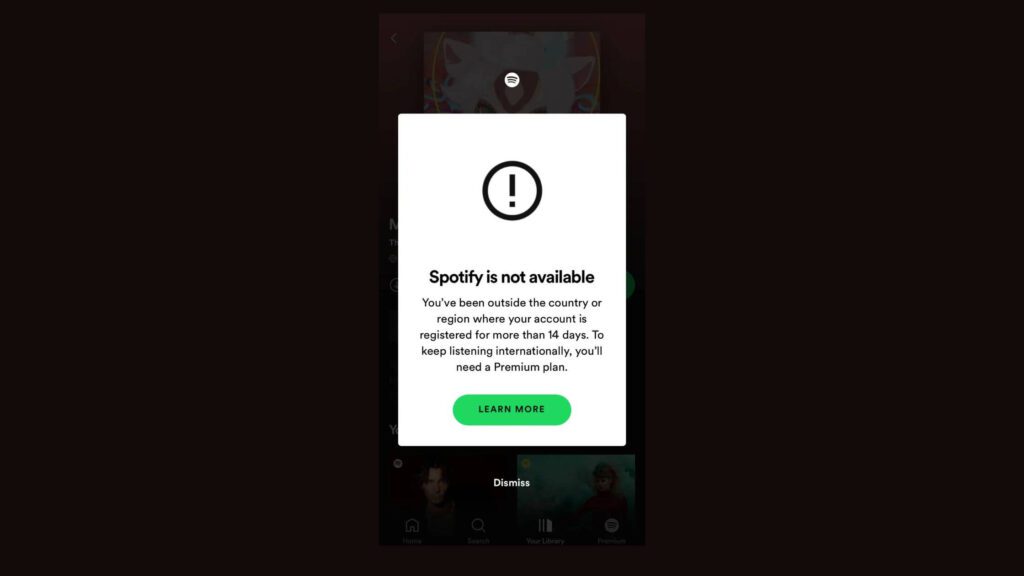
Spotify may not work in your country for several key reasons, mostly tied to licensing and local laws. Here’s a simple breakdown:
- Licensing agreements: Spotify must secure the right to stream music in each country. If the necessary agreements aren’t in place, Spotify can’t offer its services there. These agreements vary by region, which explains why certain countries might not have access to the platform.
- Government restrictions: Some governments may block Spotify due to content restrictions, censorship laws, or regulations that prevent international streaming platforms from operating freely. Countries like China, for example, have strict internet controls, which can block access to Spotify.
- Spotify’s business decisions: In some cases, Spotify might not offer services in certain countries because it’s not seen as a viable market. Factors like low demand or legal complexities might make it economically unfeasible for Spotify to operate in those regions.
- Geo-Blocking by IP: Spotify uses geo-blocking to limit access based on where users are physically located. When you connect to the internet, your device gets an IP address that reveals your location. If you’re in a restricted country, Spotify will block your access.
Countries like China, Sudan, North Korea, and Venezuela are examples where you’ll encounter Spotify blocks. If you try to use Spotify from one of these regions, the platform might display the message “Spotify is not available in your country.”
Bottom Line
The ways to change country in Spotify without being there physically is simple if you follow the right steps. Whether you’re using TurisVPN or updating your account details manually, you can access Spotify’s extensive library from any region. Following the three easy steps outlined in this guide, you’ll be able to enjoy your favorite music wherever you are.
FAQs
Q1. Can I Change Spotify Location?
Yes, you can change your Spotify location by updating your payment method to one that is valid in your desired country or by using a VPN to switch regions. For Spotify Free accounts, you can also manually change the location in the account settings if you are physically in the new region.
Q2. Why Can’t I Change My Spotify Country?
You might face issues changing your Spotify country if your payment method is tied to a different country. Spotify requires that your payment method matches the country you’re trying to set. If you’re using Spotify Free, you can only change your country when you’re physically present in the new region. For further help, update your account details or consider using TurisVPN.
Q3. What happens to Spotify if I move countries?
If you move to another country, Spotify will prompt you to change your country in the account settings. You will need to update your payment method to one from your new country. Your playlists and account will remain the same, but regional content availability may change based on local licensing agreements.
Q4. How to change country in Spotify without being there without logging in?
Unfortunately, you cannot change your Spotify location without logging into your account. You must log in to access the settings where you can manually update your country or use TurisVPN to connect to a different region and then log into Spotify.