







VPC vs VPN differ at the core: a VPC is a private cloud network for running services, while a VPN is an encrypted connection that protects data in transit. Both sound similar, both promise privacy and security, but they solve very different problems.
Our blog post clears that up. We’ll explain what VPC and VPN really are, how they differ, when to use each one, and when combining them makes the most sense. Therefore, you can choose the right solution with confidence.
Key Takeaways
|
What Is a VPC? (Virtual Private Cloud)
A VPC (Virtual Private Cloud) is a dedicated, logically isolated network inside a public cloud provider such as AWS, Microsoft Azure, or Google Cloud. It is provisioned for a single organization and is not shared with other customers, even though it runs on shared cloud infrastructure.
The primary purpose of a VPC is to enable businesses to create a private network in the cloud that functions similarly to an on-premises data center. But with cloud advantages such as instant scalability, high availability, and no physical hardware to manage. You control IP addressing, subnets, routing, and traffic rules, while the cloud provider handles the physical hardware.
In simple terms, the VPC is your private network, and cloud resources (servers, databases, load balancers) live inside it.
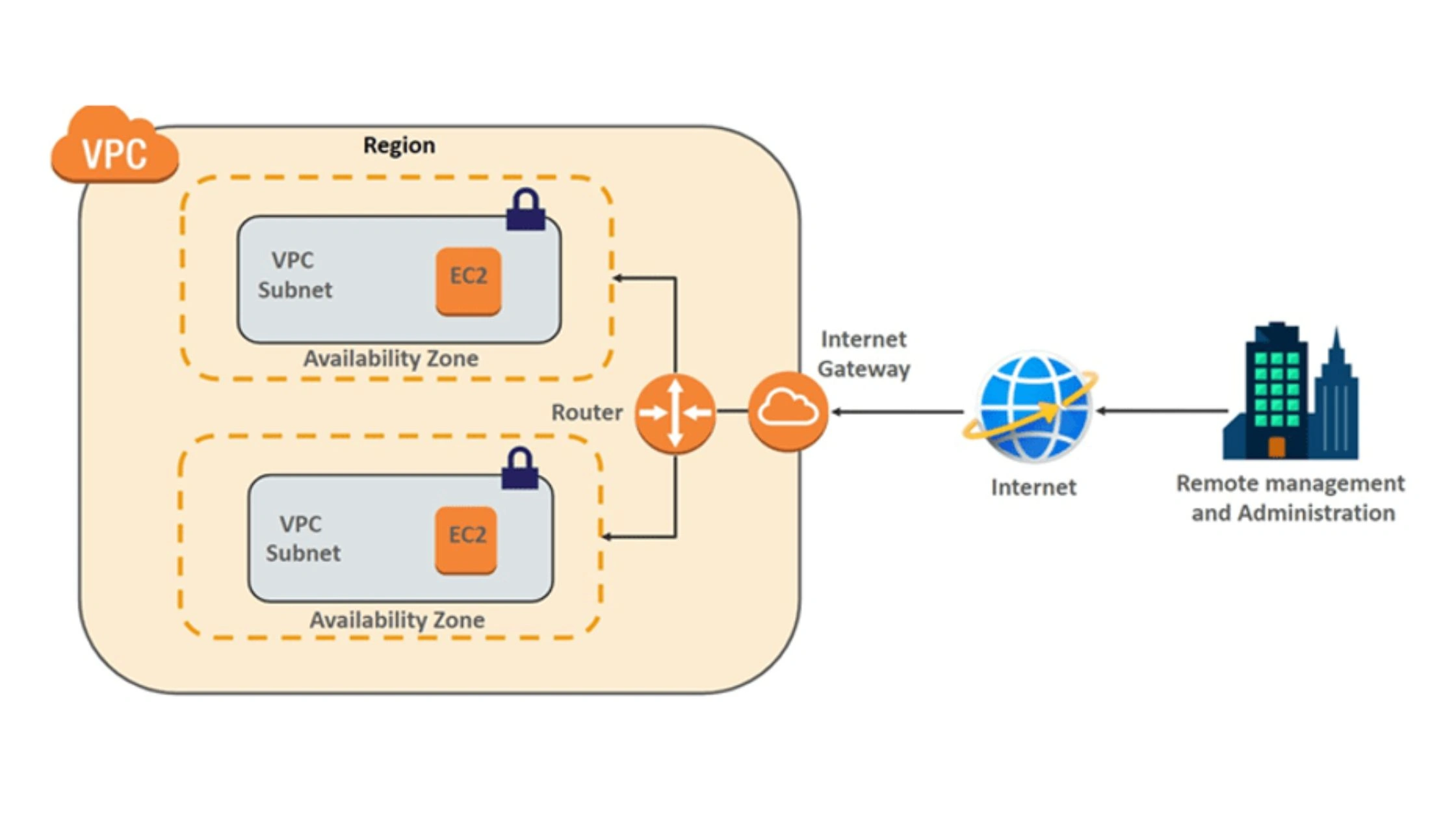
Key Components of a VPC
- IP Address Range: You choose a private IP range for the VPC (for example, 10.0.0.0/16). This defines how large your cloud network can grow.
- Subnets: Subnets divide the VPC into smaller networks. Common examples: Public subnets for web servers, private subnets for databases or internal services. Subnets help with organization, security, and traffic control.
- Route Tables: Route tables define how traffic moves: Between subnets, from the VPC to the internet, from the VPC to on-premises networks or other VPCs. Route Tables do more than just move traffic inside a VPC. They are a strategic control layer that defines how your cloud network connects to the outside world. With route tables, you control traffic between subnets, outbound access to the internet via Internet Gateways or NAT Gateways, secure VPC and on-premises connectivity, hybrid cloud architectures, VPC-to-VPC connections for multi-environment setups.
- Security Groups and Network ACLs: These act as firewalls:
- Security Groups filter traffic at the instance level
- Network ACLs (NACLs) filter traffic at the subnet level
Together, they control which traffic is allowed in or out of the VPC.
What Is a VPN? (Virtual Private Network)
A VPN (Virtual Private Network) is a technology that creates a secure, encrypted tunnel over the public internet between a device and a private network or VPN server. Instead of sending data directly over the open internet, all traffic passes through this protected tunnel.
The main purpose of a VPN is secure connectivity and remote access. It protects data in transit, verifies user identity, hides your search history and allows users to access private networks or the internet from anywhere safely. In simple terms, the VPN is the secure connection, not the network itself.
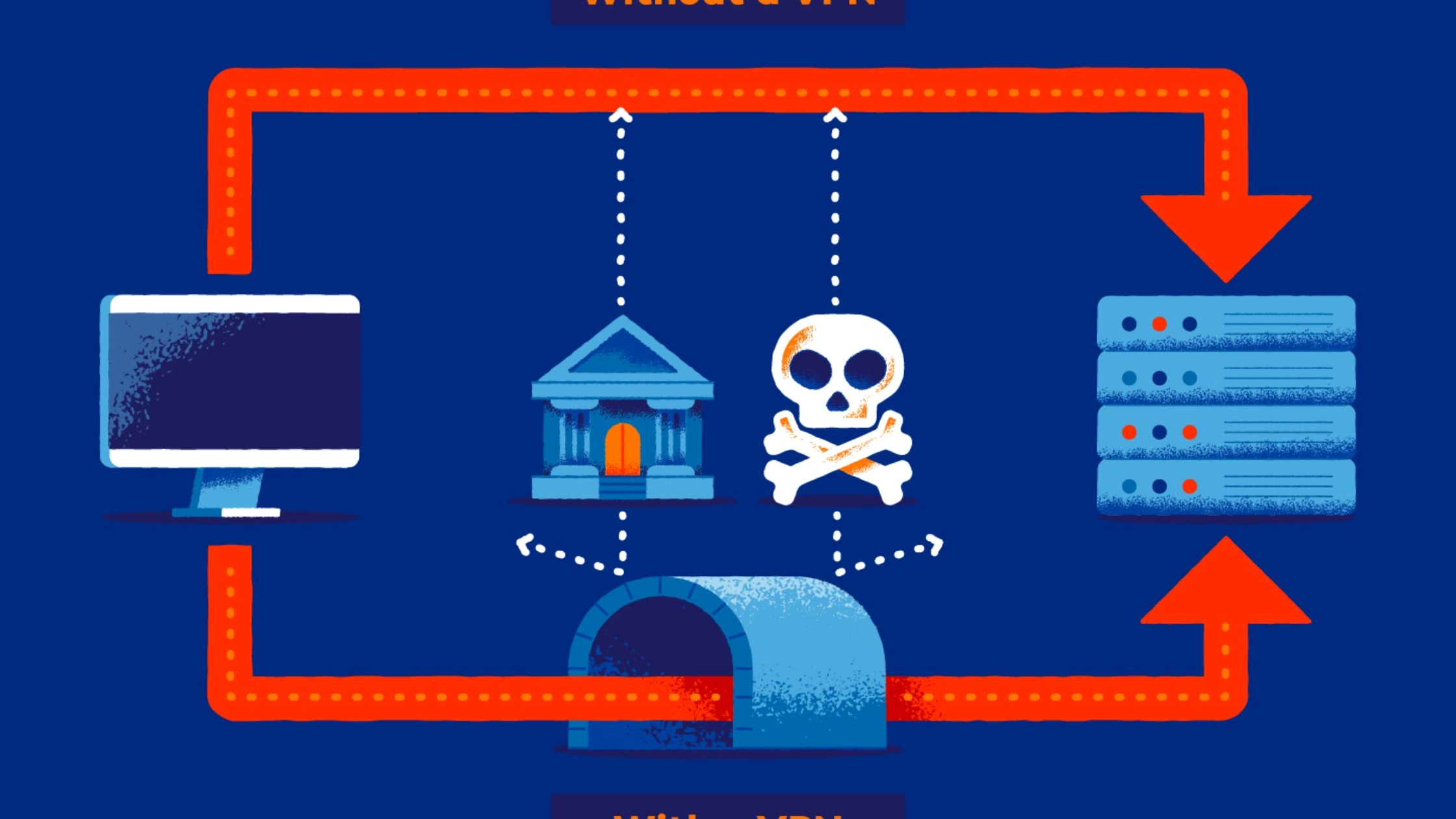
Key Components of a VPN
- Encryption: VPNs use strong encryption protocols such as IPsec, OpenVPN or WireGuard to scramble data. This prevents ISPs, hackers, or network administrators from reading your traffic.
- Tunneling: VPN tunneling wraps your data inside an encrypted “container” so it can safely travel across public networks like Wi-Fi or mobile data.
- IP Masking: When connected, your real IP address is hidden and replaced with one from the VPN server. This improves privacy and helps bypass tracking or location-based restrictions.
Types of VPNs
- Remote Access VPN (Personal or Business): Connects an individual device (laptop, phone, tablet) to a private network or routes traffic securely to the internet. Common for remote work and personal privacy.
- Site-to-Site VPN (Business Use): Connects two separate networks together, such as an on-premises office network and a cloud VPC. This creates a secure bridge between locations.
A VPN focuses on security, privacy, and access, making it ideal for remote users, public Wi-Fi protection, and secure connections to private networks.
VPC vs VPN: Key Difference
Although VPC and VPN are often mentioned together, they solve very different problems. A VPC is a private cloud network. A VPN is a secure connection. Understanding this distinction makes it much easier to choose the right one.
| Aspect | VPC | VPN |
| Core purpose | Host applications and cloud infrastructure | Securely connect users or networks |
| What it is | A private network inside a public cloud | An encrypted tunnel over the internet |
| Main use case | Run servers, databases, and services | Protect traffic and enable remote access |
| Network scope | Full cloud network (subnets, routing, firewalls) | Point-to-point connection |
| Security model | Network isolation + access rules | Encryption + authentication |
| Encryption focus | Mostly at rest and within the cloud backbone | Strong encryption for data in transit |
| Scalability | Highly scalable by design | Limited, harder at a large scale |
| Performance | High throughput, low latency | Depends on the internet + encryption overhead |
| Typical users | Cloud engineers, DevOps, and enterprises | Remote workers, travelers, businesses |
| Cost structure | Pay for cloud resources used | Subscription or per-connection pricing |
| Works together? | Often paired with VPN for access | Commonly used to access a VPC |
Purpose and functionality
VPC: A VPC is designed to run applications and infrastructure in the cloud. It hosts servers, databases, load balancers, and internal services. The goal is scalability, availability, and full control over networking rules inside a private cloud environment.
VPN: A VPN is designed to protect data in transit and enable secure access. It encrypts traffic and allows users or networks to safely connect to a private network (such as an office LAN or a VPC) from remote locations.
Network architecture comparison
VPC Architecture: A VPC is a structured and segmented cloud network. You define:
- A private IP range (CIDR)
- Subnets (public and private)
- Route tables
- Gateways and firewalls
Isolation is enforced by the cloud provider’s virtualization layer. Resources inside the VPC communicate using private IP addresses, completely separated from other tenants.
VPN Architecture
A VPN uses a point-to-point tunnel. A VPN client creates an encrypted connection to a VPN server or gateway. All traffic inside this tunnel travels over the public internet but appears as secure, unreadable data to outsiders.
Access control: isolated cloud network vs encrypted tunnel
VPC Access Control: Access is controlled at the network level:
- Security Groups control inbound/outbound traffic to resources
- Network ACLs filter traffic at the subnet level
- IAM policies control who can manage the network
Only allowed traffic reaches workloads inside the VPC.
VPN Access Control: Access is controlled at the user or device level:
- Username/password, certificates, or keys
- Device authentication
- Session-based access
Once authenticated, the user gains secure access through the tunnel.
Security and encryption differences
VPC Security: VPC security focuses on isolation and segmentation:
- Logical separation from other cloud customers
- Traffic filtering via Security Groups and NACLs
- Encryption at rest for storage
- In-cloud traffic often runs on encrypted provider backbones
The VPC itself is private by design.
VPN Security: VPN security focuses on protecting traffic in transit:
- Strong encryption (e.g., AES-256)
- Secure tunneling protocols (WireGuard, IPsec, OpenVPN)
- Protection from eavesdropping on public networks
A VPN does not isolate resources, it protects the path to them.
Scalability and performance differences
VPC Scalability and Performance
- Designed for massive scale
- Resources can be added or removed instantly
- High throughput and low latency
- Traffic stays within the cloud provider’s high-speed internal network
VPCs are ideal for production systems and large workloads.
VPN Scalability and Performance
- Works well for individuals and small teams
- Becomes complex at large scale (many tunnels, users, or sites)
- Performance depends on: Internet speed, VPN server capacity, encryption overhead
VPNs typically add more latency than native cloud networking.
Cost considerations: cloud resources vs VPN services
VPC Costs
- Creating a VPC is usually free
- Main costs come from: Compute instances, storage and databases, NAT gateways, data transfer (egress fees)
- Costs scale with usage
VPN Costs
- Personal VPN: low monthly subscription
- Business VPN: priced per user or concurrent connection
- Cloud VPN gateways: charged by: Connection hours, data transferred
VPNs are generally cheaper but limited in scope.
When to Use a VPC?
A VPC is the right choice when you are building, hosting, or scaling systems in the cloud and need strong isolation, control, and compliance. It is designed for businesses, IT teams, and cloud engineers not for casual browsing or simple privacy needs.
Security and Isolation
Use a VPC when you host sensitive data or critical systems such as customer information, internal tools, or financial workloads. A VPC keeps your resources logically isolated from other cloud tenants and lets you strictly control which traffic is allowed in or out.
Meeting Compliance Requirements
Many regulations require network-level isolation and access control. A VPC helps meet standards like HIPAA, PCI DSS, SOC 2, and GDPR by allowing private subnets, firewall rules, audit logs, and restricted access paths.
Hybrid Cloud Deployments
A VPC is essential when you want to extend your on-premises network into the cloud. Businesses commonly connect offices or data centers to a VPC using site-to-site VPNs or dedicated links, creating one unified private network.
Multi-tier Application Architecture
Use a VPC when your application has multiple layers. For example, web servers can live in public subnets while databases stay in private subnets. This design reduces attack surfaces and improves security and performance.
Network Customization and Control
Choose a VPC when you need full control over networking, including IP ranges, routing tables, NAT gateways, firewalls, and internal traffic flow. This level of control is not possible with simple VPN-only setups.
Connecting Multiple VPCs
Large organizations use VPCs to separate development, staging, and production environments or different business units. These VPCs can be securely connected using VPC Peering or Transit Gateways, while still remaining isolated.
When to Use a VPN?
A VPN is the right tool when your goal is secure access, privacy, and protection over the public internet. It is user-focused and connection-centric, not infrastructure-centric like a VPC.
When using public Wi-Fi
Public hotspots in cafés, airports, hotels, and malls are often unencrypted. A VPN encrypts your traffic, protecting passwords, messages, and sensitive data from hackers, packet sniffers, and man-in-the-middle attacks.
For remote work
A remote access VPN lets employees securely connect to company systems from home or on the road. It creates a safe tunnel to internal resources hosted on-premises or inside a VPC, without exposing those systems to the public internet.
To bypass censorship and restrictions
VPNs are widely used to circumvent government firewalls, school or workplace blocks, and network restrictions. By routing traffic through another country, the connection appears to originate elsewhere.
To access geo-restricted content while traveling
Many streaming platforms, news sites, and services limit access by country. A VPN lets you use an IP address from your home country so you can access local content while abroad.
To prevent ISP tracking and throttling
Internet service providers can monitor domains you visit and throttle certain traffic types. A VPN hides browsing activity from ISPs, reducing tracking and helping avoid slowdowns on streaming, gaming, or downloads.
For enhanced online privacy
A VPN masks your real IP address, making it harder for websites, advertisers, and trackers to link activity back to you. This reduces profiling and cross-site tracking.
In short, use a VPN when you need privacy, encryption, and secure access over the internet, not when you need to build or manage cloud infrastructure.
Can You Use VPC and VPN Together?
Yes, absolutely. A VPC and a VPN are often used together and are considered complementary technologies, not alternatives. One provides the private cloud network (VPC), and the other provides the secure connection (VPN).
Common Use Cases
- Remote Employee Access: A remote employee uses a remote access VPN on their laptop or phone to create an encrypted tunnel to a VPN gateway inside the VPC. This allows the employee to securely access cloud servers, databases, and internal tools as if they were inside the company network, even when working from home or public Wi-Fi.
- Hybrid Cloud Connectivity: A site-to-site VPN connects an on-premises data center or office network to a VPC. This setup extends the corporate network into the cloud, enabling systems on-prem and in the VPC to communicate securely over encrypted tunnels. It is commonly used during cloud migration or in long-term hybrid cloud architectures.
How They Work Together
- VPC: the private, isolated cloud network where applications live
- VPN: the secure tunnel that lets users or offices reach that network safely
In real-world enterprise setups, it’s very common to see multiple VPN connections feeding into one or more VPCs, forming the backbone of secure cloud infrastructure.
VPC vs VPN: Which One Should You Choose?
The right choice depends on what problem you are trying to solve. A VPC and a VPN serve different roles, so the decision is usually clear once your use case is defined.
- Choose a VPC if: You are a business or development team that needs to host applications, databases, or services in the cloud. A VPC is ideal when you need scalability, high availability, strict network isolation, and full control over IP addressing, routing, and firewall rules.
- Choose a VPN if: You are an individual user or a remote employee who needs to secure an internet connection or access a private network remotely. A VPN is best for encrypting traffic on public Wi-Fi, enabling remote work, protecting privacy, and bypassing network or regional restrictions.
- Choose Both if: You run a business with remote employees, multiple offices, or a hybrid cloud setup. In this case, the VPC hosts your cloud resources, and the VPN ensures all connections from employees or on-prem offices to the VPC are fully encrypted and secure.
Bottom Line
VPC vs VPN is a comparison of two tools built for different jobs. A VPC gives businesses a private, controlled cloud network to run applications and store data. A VPN protects connections by encrypting traffic and allowing secure remote access over the internet.
If you need to build and manage cloud infrastructure, a VPC is the right foundation. If you need to secure connections, protect privacy, or work remotely, a VPN is essential. In many real-world setups, the best solution is using both together, a VPC for hosting resources and a VPN to safely connect users and offices to that environment.
FAQs
Q1. Is a VPC more secure than a VPN?
No, security depends on purpose. A VPC provides strong isolation and network control for cloud resources. A VPN secures data in transit. They protect different layers and are often used together.
Q2. Do I need a VPN if I already have a VPC?
Yes, if users or offices access the VPC remotely. A VPN encrypts the connection from devices to the VPC. Without it, access is exposed over the public internet.
Q3. Does VPN slow down traffic compared to VPC?
Yes, usually. VPN traffic goes over the public internet and adds encryption overhead, which can increase latency. VPC internal traffic runs on the cloud provider’s high-speed backbone and is faster.
Q4. Can I use VPC peering instead of VPN?
Only in some cases. VPC peering connects two VPCs inside the cloud. It does not replace a VPN for remote users or on-premises networks, where a VPN (or Direct Connect) is still required.





