Does VPN hide search history from the Wi-Fi owner or ISP? In today’s hyper-connected world, both private and public networks can log your online activity from websites visited to search queries. Our blog post will break down how VPN encryption works, what it can hide, what it can’t, and the extra steps you can take to keep your browsing truly private.
Key Takeaways
| – A VPN hides your search history from ISPs, Wi-Fi owners, and public networks by encrypting your internet traffic. – VPNs can mask your IP address, location, and online activity, but they don’t erase local browser history or logged-in account activity. – Without a VPN, ISPs and network admins can log websites you visit, search terms, and unencrypted page content. – TurisVPN offers no-logs protection, modern protocols like WireGuard, and features like IP-2Hop for double IP masking. – For full privacy, pair your VPN with private browsing, cookie management, and anti-tracking tools. |
Does VPN Hide Search History?
Yes, a VPN can hide search history from your Wi-Fi owner, ISP, or anyone else trying to peek at your activity. However, there’s a difference between the search history saved in your browser or search engine and the search history that your ISP or Wi-Fi owner can see.
The search history in your browser is stored locally on your device and can only be accessed by you or the search engine provider. On the other hand, your ISP or Wi-Fi owner can see the websites you visit and search queries you make through your IP address, unless you use a VPN to encrypt your internet traffic.
A VPN (Virtual Private Network) encrypts your internet traffic before it leaves your device. This makes the data unreadable to anyone monitoring your connection. Without a VPN, your browsing requests travel in plain form through your router and internet service provider (ISP).
Your ISP can log the websites you visit and the search terms you use. They can also note the exact time of each visit. Wi-Fi owners and network administrators can check router logs to see which sites were visited on their network.
When you connect to a VPN, your IP address changes to that of the VPN server. This hides your search history from ISPs and Wi-Fi owners. They can still see that you are using a VPN. They may also see the time you connected, the amount of data you used, and the VPN server location. They cannot see the sites you visit or the search terms you type.
VPN anonymous surfing works, but it is not perfect. Your VPN provider can see your browsing activity in theory. That is why you should choose a provider with a strict no-logs policy and third-party audits. A reliable provider will not store records of your activity.
A VPN does not erase local traces of your browsing. Cookies, downloads, and saved search history can still remain on your device. Search engines such as Google can log your searches if you are signed into your account.
In short, a VPN can block your search history from your ISP, your Wi-Fi owner, and most third parties. For full privacy, you should also clear cookies, use private browsing, and pick a VPN with strong privacy protections.
What Does a VPN Hide and What Doesn’t?
A VPN can make your browsing more private, but it is not a magic invisibility cloak. Here’s what VPNs hide and what they don’t.
What VPNs Hide
- IP address: A VPN masks your real IP address and hides your true location.
- Browsing and search activity: Your ISP, local networks, and public Wi-Fi sniffers cannot see the sites you visit or the terms you search for.
- Personal information: Credentials, payment details, and other sensitive data are protected when sent over unsecured networks.
- Online identity: Some VPNs block tracking cookies and scripts that follow you across websites.
- Location data: Many VPNs spoof your GPS or virtual location, making it look like you are in another city or country.
- Virtual location: This allows you to bypass geo-blocks, censorship, and regional price differences.
- Downloads: ISPs cannot see the files you download, though they still know you are transferring data.
- Streaming and gaming activity: A VPN can prevent ISP throttling that slows you down based on activity type.
- Sensitive personal data: Protects passwords, banking info, and private files over public Wi-Fi.
What VPNs Don’t Hide
- Searches tied to logged-in accounts: If you are logged into Google, YouTube, or similar, those services still log your searches.
- Local browser history: Your browsing history remains on your device unless you delete it or use private browsing mode.
- Existing cookies and trackers: VPNs do not remove tracking cookies that are already stored in your browser.
- Activity on malicious or phishing sites: A VPN does not replace antivirus software. You still need protection against malware and scams.
In short, VPNs make your internet use more private, but they are only one part of staying safe online. Combine them with private browsing, cookie management, and good security tools for full protection.
Why Wi-Fi Owners Can See Your Activity Without VPN?
When you browse without a VPN, your internet traffic is not encrypted. Every request you make passes through the local router in plain text.
Wi-Fi owners such as school administrators, employers, or public hotspot operators can check router logs. These logs can show the domains you visited, the search terms you entered, and even the content of unencrypted pages.

Internet service providers can also track your browsing history. They may store this data for months or years, and in some regions, they can legally sell it to advertisers. In certain cases, ISPs must share this information with government agencies upon request.
If you want to know what’s visible without protection, you can check website traffic logs on a router. These logs often reveal the history of sites visited, making your activity far from private.
The only way to prevent Wi-Fi owners and ISPs from tracking you is to use encryption, and a VPN is one of the simplest tools to achieve it.
How VPNs Hide Your Search History?
A VPN hides your search history by encrypting your internet traffic and routing it through a secure server. This process shields your activity from Wi-Fi owners, ISPs, and anyone trying to monitor your connection.
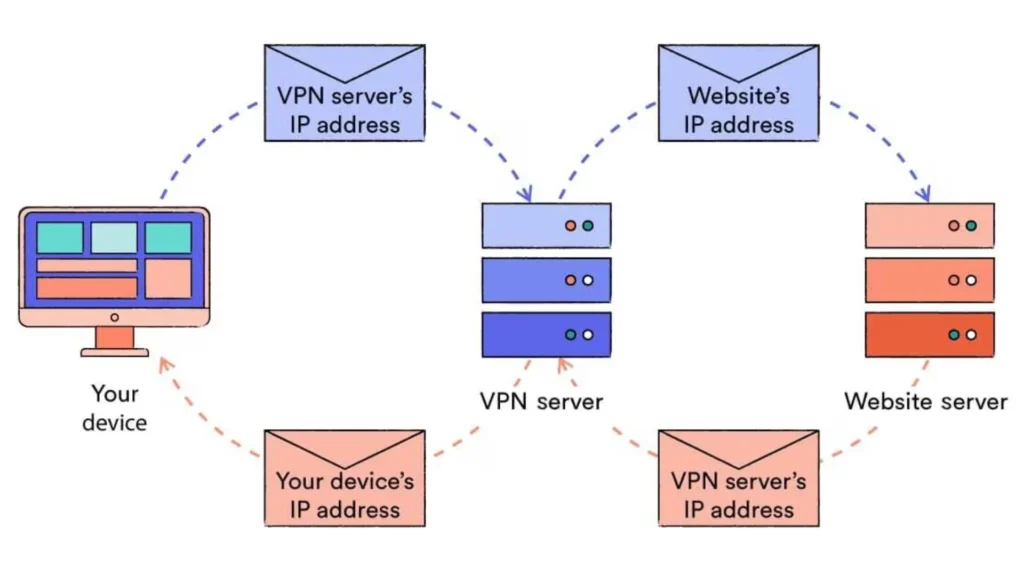
Here’s how it works step-by-step:
Masking Your IP Address to Hide Search History
Your IP address is a unique identifier that reveals your device’s location and allows others to link your online activity back to you. A VPN replaces your real IP address with one from its server. This makes it appear as though your browsing and searches come from the VPN server’s location, not your own.
Hiding Your Location to Protect Your Search Activity
By changing your IP, a VPN also hides your true geographic location. This prevents websites, advertisers, and networks from using location data to profile you. It also allows you to bypass regional restrictions and censorship while keeping your searches private.
Use of Secure DNS Servers to Protect Your Queries
Without a VPN, DNS requests, which translate website names into IP addresses, often go through your ISP’s servers. This means they can log every site you try to visit. A VPN uses its own secure DNS servers, encrypting those queries so they can’t be monitored or tampered with.
Prevent ISPs from Tracking Your Search History
Once your data is encrypted, your ISP can see only that you’re connected to a VPN, not the websites you visit or the terms you search. This stops them from logging your browsing history, selling it to advertisers, or handing it over to third parties.
VPN vs Private Browsing: Which Protects Your Search History?
Many people confuse private browsing with a VPN, but they work in very different ways. Here’s a quick side-by-side comparison:
| Feature | VPN | Private Browsing (Incognito) |
| Hides from ISP/Wi-Fi? | ✅ | ❌ |
| Clears local history? | ❌ | ✅ |
| Encrypts traffic? | ✅ | ❌ |
| Blocks cookies? | ❌ | Partially |
VPN (Virtual Private Network)
A VPN works at the network level. It encrypts all your internet traffic and routes it through secure servers, hiding it from your ISP, router, and public Wi-Fi networks. This makes it nearly impossible for these parties to see your browsing history or search activity. However, it does not stop websites or logged-in accounts (like Google or Facebook) from tracking you.
Private Browsing / Incognito Mode
Private browsing deletes local browsing history, cookies, and cache when you close the session. This prevents others who use your device from seeing what you’ve done online. But it does not hide your activity from your ISP, Wi-Fi owner, or the websites you visit.
How to Use TurisVPN to Hide Your Browsing History from Your ISP or Wi-Fi Owner
TurisVPN is designed to keep your browsing private with strong encryption, modern protocols, and unique privacy tools.
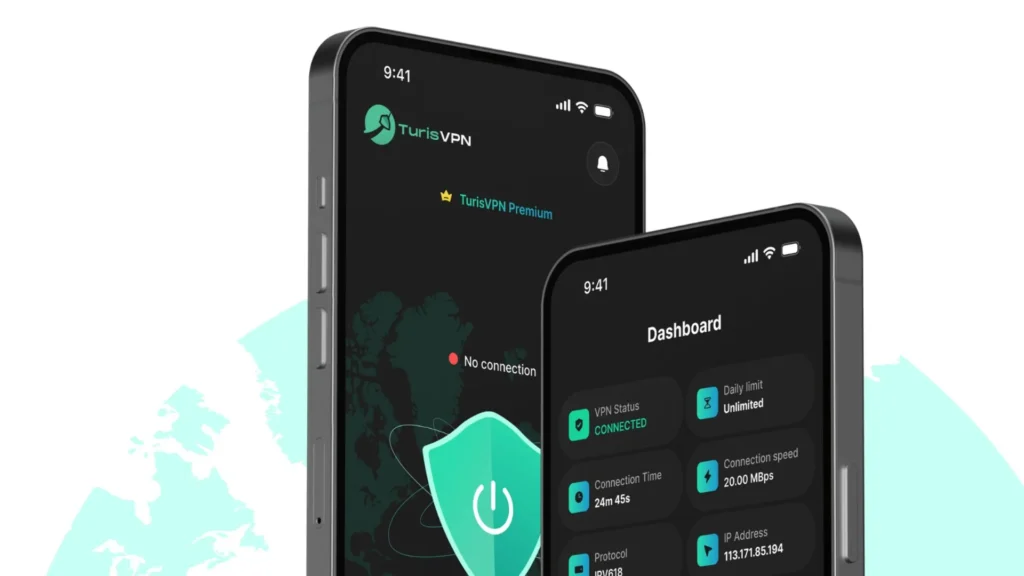
Here’s how to use it effectively:
- Step 1: Download and Install TurisVPN: Get TurisVPN from the official website, app store, or Chrome extension store.
- Step 2: Select a Server Location: Pick a server from TurisVPN’s global list (e.g Singapore VPN). For stronger anonymity, try the IP-2Hop feature, which routes your connection through two different servers for double IP masking and enhanced privacy.
- Step 3: Browse with No-Logs Protection: TurisVPN’s strict no-logs policy ensures your online activity isn’t recorded. This means ISPs, Wi-Fi owners, and even TurisVPN itself can’t track your browsing history.
- Step 4: Enjoy Unlimited Secure Browsing: With unlimited time and data on all plans (even the free one), you can keep your VPN running all the time for continuous protection.
- Step 5: Turn On IP-2Hop When Needed: For high-risk situations, connect to IP-2Hop servers to mask your IP twice and bypass geo-blocks with maximum privacy.
By following these steps, you can hide your browsing history from ISPs, Wi-Fi owners, and anyone trying to track your online activity, all while enjoying faster, safer, and more open internet access.
How to Choose the Right VPN for Privacy Protection
Not all VPNs offer the same level of privacy. To truly protect your search history and online activity, look for these key factors:
No-Logs Policy (and Third-Party Audits)
Choose a VPN that has a strict no-logs policy, meaning it does not store records of your browsing history or connection data. For extra assurance, check if this claim has been independently audited by a trusted cybersecurity firm.
Strong Encryption and Modern Protocols
Opt for VPNs that use AES-256 encryption for maximum security. Modern protocols like WireGuard or OpenVPN offer a balance of speed and safety. Also, make sure the VPN includes a kill switch to block traffic if your VPN connection drops, preventing accidental exposure.
Jurisdiction
Privacy laws vary by country. For better protection, choose a VPN based in a privacy-friendly country outside the 5/9/14 Eyes alliances, which are international surveillance-sharing agreements.
Security Features
Look for extras like DNS leak protection, WebRTC leak blocking, malware filtering, and obfuscation tools that disguise VPN traffic as regular HTTPS to bypass network blocks.
Payment and Registration Privacy
A privacy-focused VPN should accept anonymous payment methods such as cryptocurrency or gift cards. They should also require minimal personal information when you sign up.
Transparent Privacy Policy and Reliability
Read the privacy policy carefully to see exactly what data (if any) is collected. Choose providers with a clean security record and no history of major breaches or data leaks.
By following these criteria, you can find a Free VPN that not only hides your search history but also protects your privacy in the long term.
| >> Read more: A free VPN is a simple solution for online privacy VPN Settings for Clearer VoIP Calls How Much Data Does a VPN Use Per Hour |
Bottom Line
A VPN hides your search history and browsing activity from ISPs, Wi-Fi owners, and public networks. It encrypts your traffic, masks your IP address, and keeps your online movements private at the network level.
However, a VPN is not a magic invisibility cloak. Websites, advertisers, and logged-in accounts can still track you through cookies, browser fingerprints, or voluntary data you share.
For full-spectrum privacy, combine your VPN with anti-tracking tools, cookie blockers, private search engines, and cautious account use.
FAQs
Q1. Does a VPN Hide You Completely?
No. A VPN offers strong privacy protection but cannot make you completely anonymous. Data you share online, cookies, and account activity can still identify you.
Q2. Can You Be Tracked If You Use a VPN?
Yes, but it’s much harder. Websites can still track you with cookies or browser fingerprinting. If you log into accounts like Google or Facebook, they can see your activity on their platforms.
Q3. Can Your Employer See What You Do with a VPN?
If you’re connected to your employer’s VPN or network, they can still monitor your work activity. On a personal VPN, they can see you’re connected to a VPN but not the websites you visit or your search terms.